Forums on Intune, SCCM, and Windows 11

Welcome to the forums. Register a free account today to become a member! Once signed in, you'll be able to participate on this site by adding your topics and posts, as well as connect with other members through your own private inbox!

PENDING Clients showing offline after 2103 update

  • Thread starter Thread starter ITGurl22
  • Start date Start date
  • Replies Replies 14
  • Views Views 7K

ITGurl22

Active Member
Messages
25
Solutions
1
Reaction score
1
Points
3
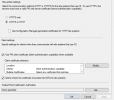
After successfully updating to SCCM 2103, all of my clients are showing offline. I've checked IIS and the website is running. I've rebooted the server and that didn't help. I switched the Site system settings back to HTTPS or HTTP thinking that would make a difference, but it didn't. Any help would be appreciated.
1622730388080.png
 
Solution
I was able to resolve the issue. I spun up a VM backup taken the day before I upgraded and put the Management Point back to HTTP. What a mess.
After looking at the Site Status, my Management point has a Critical Status. How do I fix this? I looked into the log files and see that the Management Point failed to install with error 1603. I went through the steps in this article and it did not resolve it: https://www.prajwaldesai.com/sccm-management-point-uninstall-error-1603/
Is there something in IIS that I need to fix?
 
Last edited:
This could be due to previous version of the client being installed on the server. You have to dig deeper in the MPMsiLog.LastError to see the root cause.
 
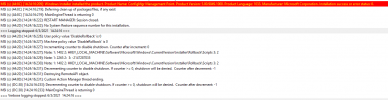
This is what I see as of this morning in the mpMSI.log:
1622812700882.png
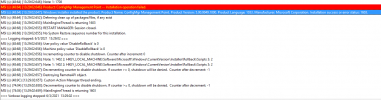
This is what I see in the mpMSI.log.LastError:
1622813398184.png
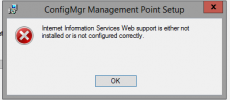
My gut tells me it has something to do with IIS. Once I upgraded to 2103, in IIS, the binding for 443 changed and it now has a certificate attached to it. It never did before, because I have screen shots of those bindings prior to the upgrade. When I try to manually install mp.msi in this folder: C:\Program Files\Microsoft Configuration Manager\bin\X64
I get the following error message:
1622813291015.png
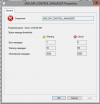
In the Console, I still show a critical status next to Management Point:
1622813504063.png
I have previously removed the old client from the server based on that article I posted in the first message.

Thanks again for any help!
 
Ok. Intresting issue.
As per mp logs, it's says that there could traces of old client in wmi that might causing the mp to fail. Reinstall the client completely and try installing the mp role
. If Still issue persist, run below ps to remove the old client traces from wmi

Get-WMIObject -namespace “root” -query “SELECT * FROM __Namespace where name = ‘ccm'” | remove-wmiobject

. I am not sure about the IIS error popup. We will look into if this wouldn't solve
 
Noob question, do I install the old client (5.00.8790.1007) or the new one (5.00.9049.1010) onto the server?
 
Still no luck. I re-installed the latest client on the server, rebooted and then was prompted with an error message saying that a file named "program" was already in use and to re-name it to program3.

Computers still not connecting, so I uninstalled the client and ran the powershell script. Do I need to remove the Management point role and re-install it?
1622817667890.png
 
Here is an update: After about an HOUR the MP reinstalled AFTER I provided IIS binding 443 with a different certificate. The MP still has a critical status, and it's now showing 249.5 GB where previously it was showing 0. I still do not have any clients that are connected to the console.
I do show this error message in the mpcontrol log:
Call to HttpSendRequestSync failed for port 443 with status code 403, text: Forbidden
 
Last edited:
I deleted and re-added both bindings in IIS and now I show the MP with a green check mark. I no longer get the error message about 403 in the mpcontrol.log. Actually all of the site components have green check marks. However, my clients are still not showing connected. Is there another log file I can look at?
 
What the heck. I updated this on June 3rd and it's still broken. I only need it for the month of June and then I'm switching to Desktop Central. I shouldn't have even updated it!
 
I was able to resolve the issue. I spun up a VM backup taken the day before I upgraded and put the Management Point back to HTTP. What a mess.
 
Solution

Forum statistics

Threads
7,171
Messages
27,987
Members
18,294
Latest member
DST

Trending content

Back
Top