

awachens
Well-Known Member
- Messages
- 65
- Solutions
- 6
- Reaction score
- 1
- Points
- 8
Afternoon!!
Have clients changing to another site system and I don't know why.
I'm new in this client and I detected this few days ago. I want to know how can I troubleshoot this because I check boundaries and we have set correctly.
I check locationservices.log and I didn't see any errors, just is looking for wrong site (XXY for example) and not AAA as I want .
.
But I can see this:
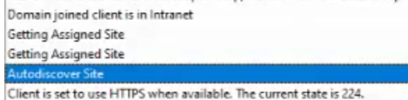
How is possible? Is a wrong configure at the other site? I can't see the configure of the other site (XXY) because we haven't access to it.... But I don't like this Autodiscover Site and at next line assign directly the wrong code automatically...
If I find at registry I can see how the wrong site code is assigned.
If I find at configuration manager client to find the correct site, take the new site again.
Maybe if I reinstall the client it's possible it gets the correct site but I want make sure this not pass again and understand why my clients are changing to another site ...
We haven't GPO to set the site code.
I don't know why automatically they roam....
TIA!!!
Have clients changing to another site system and I don't know why.
I'm new in this client and I detected this few days ago. I want to know how can I troubleshoot this because I check boundaries and we have set correctly.
I check locationservices.log and I didn't see any errors, just is looking for wrong site (XXY for example) and not AAA as I want
.But I can see this:
How is possible? Is a wrong configure at the other site? I can't see the configure of the other site (XXY) because we haven't access to it.... But I don't like this Autodiscover Site and at next line assign directly the wrong code automatically...
If I find at registry I can see how the wrong site code is assigned.
If I find at configuration manager client to find the correct site, take the new site again.
Maybe if I reinstall the client it's possible it gets the correct site but I want make sure this not pass again and understand why my clients are changing to another site ...
We haven't GPO to set the site code.
I don't know why automatically they roam....
TIA!!!




