Forums on Intune, SCCM, and Windows 11

Welcome to the forums. Register a free account today to become a member! Once signed in, you'll be able to participate on this site by adding your topics and posts, as well as connect with other members through your own private inbox!

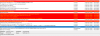
SOLVED Client push installation failed: CcmSetup failed with error code 0x80004005

Status
Not open for further replies.

mathiasottsen

Member
Messages
5
Reaction score
0
Points
1
I'm getting a few error codes preventing me from reaching the client through a client push installation.
I've been following your guide with huge success until now.
I've tried to reapply the MP but that didn't make any difference.
Firewall settings have been configured.

SCCM ver: 1902 - 5.00.8790.1000

Any suggestion?
 

Attachments
  • sccmerror.png
    sccmerror.png
    57.8 KB · Views: 12
  • sccmerrror.png
    sccmerrror.png
    2.6 KB · Views: 12
Last edited:
Make sure that the boundaries and boundaries groups are configured correctly, assign each Subnet network with her Site server system (DP).
 
Make sure that the boundaries and boundaries groups are configured correctly, assign each Subnet network with her Site server system (DP).

It's very likely that it's related. I haven't really done much to do boundary groups. I only have this boundary attached to a boundary group. Should i create a new boundary attached to the same group based on the network subnet instead?
 

Attachments

  • scccccm.png
    scccccm.png
    8.9 KB · Views: 9
The best way is to create boundaries based on Subnet and add it in the new boundary group with specifying your DP/MP related to this Subnet/site.

More details about boundaries/boundary groups: https://docs.microsoft.com/en-us/sc...re/define-site-boundaries-and-boundary-groups

Step by step configuring discovery and boundary groups: https://www.prajwaldesai.com/configuring-discovery-and-boundaries-in-configuration-manager-2012-r2/

Boundary group fixed first part of the issue. Had another error saying that it failed to connect to DPlocation expected from the MP. However this was fixed by deleting a corrupt DNS record as it was not updated with the correct IP. Now it's fully working so you can close this as solved :-)

Thanks a lot.
 
Status
Not open for further replies.

Forum statistics

Threads
7,166
Messages
27,974
Members
18,275
Latest member
hacher

Trending content

Back
Top

