Forums on Intune, SCCM, and Windows 11

Welcome to the forums. Register a free account today to become a member! Once signed in, you'll be able to participate on this site by adding your topics and posts, as well as connect with other members through your own private inbox!

PENDING Client cache file full - Current size 5120MB

  • Thread starter Thread starter Nitin_ted
  • Start date Start date
  • Replies Replies 8
  • Views Views 2K

Nitin_ted

Well-Known Member
Messages
87
Solutions
1
Reaction score
2
Points
8
Can anyone please share the script to clear Cache (ccm folder) file for client device. So i can deploy to client machines.
Also please share script to run script manually from SCCM? (Add script in sccm - software libabry - Script)

i'm so new to sccm, i not able to deploy any application or software updates if cache is full for client machines. Please correct if i'm wrong here.
 
Can anyone please share the script to clear Cache (ccm folder) file for client device. So i can deploy to client machines.
Also please share script to run script manually from SCCM? (Add script in sccm - software libabry - Script)

i'm so new to sccm, i not able to deploy any application or software updates if cache is full for client machines. Please correct if i'm wrong here.
Use the below script to delete the cache items. $MinDays is the number of days you want to keep in cache. i usually delete everything thats more than 30 days. you can both deploy as application, package or run as script

$MinDays = 30
$UIResourceMgr = New-Object -ComObject UIResource.UIResourceMgr
$Cache = $UIResourceMgr.GetCacheInfo()
$Cache.GetCacheElements() |
where-object {[datetime]$_.LastReferenceTime -lt (get-date).adddays(-$mindays)} |
foreach {
$Cache.DeleteCacheElement($_.CacheElementID)
}
 
Use the below script to delete the cache items. $MinDays is the number of days you want to keep in cache. i usually delete everything thats more than 30 days. you can both deploy as application, package or run as script

$MinDays = 30
$UIResourceMgr = New-Object -ComObject UIResource.UIResourceMgr
$Cache = $UIResourceMgr.GetCacheInfo()
$Cache.GetCacheElements() |
where-object {[datetime]$_.LastReferenceTime -lt (get-date).adddays(-$mindays)} |
foreach {
$Cache.DeleteCacheElement($_.CacheElementID)
}
Hi @AhmedLS thanks alot. Also, before deploy i copy this script in .txt and save as vbs and deploy as application or package correct? For Run as Script simply add the script in the script option and run on the device manually if needed.
 
Hi @AhmedLS thanks alot. Also, before deploy i copy this script in .txt and save as vbs and deploy as application or package correct? For Run as Script simply add the script in the script option and run on the device manually if needed.
this is powershell not vbs. you have to save as PS1 and the rest is YES
 
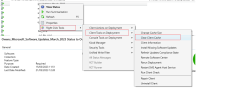
Follow this step - https://www.prajwaldesai.com/right-click-tools-sccm-console-extension/ to install Recast software.

Once the installation is complete, navigate to the collection where you wish to remove the cache and follow the instructions indicated in the screenshot.

View attachment 5130
@AhmedLS thanks.
@MJ-Tech Thanks for advice. If i clear cache, does it affect any application/security updates for user device? many users getting a pop-up cmd to clear space in ccm cache folder.
 
@AhmedLS thanks.
@MJ-Tech Thanks for advice. If i clear cache, does it affect any application/security updates for user device? many users getting a pop-up cmd to clear space in ccm cache folder.
It will not harm any installation files. If you reinstall the application, sccm will attempt to use the ccmcache source file. If the source files are not available, it will download them and install the application.

You can try this step in one testing machine to see how it goes.
 
hi try the script
but it is not deleting all file for the cache folder,
$UIResourceMgr.GetCacheInfo() is missing some files (old files and temp files)
is there a way to totally clear the folder?
 
Back
Top