Forums on Intune, SCCM, and Windows 11

Welcome to the forums. Register a free account today to become a member! Once signed in, you'll be able to participate on this site by adding your topics and posts, as well as connect with other members through your own private inbox!

PENDING Checking Prerequisites warning - SCCM 1610

Messages
20
Reaction score
0
Points
1
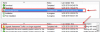
I'm working to upgrade my SCCM version from 1610 to 1710 and after made check prerequisites , i found there are two warning as shown in the attached print screen.
i have uninstalled the old version of ADK then installed the latest version then tried again without any positive progress.
please help
 

Attachments

  • 2222.png
    2222.png
    58.4 KB · Views: 7
  • 3333.png
    3333.png
    23.9 KB · Views: 7
System Center Configuration Manager Upgrade Assessment Tool.

The Upgrade Assessment Tool depends on both System Center Configuration Manager and the Application Compatibility Toolkit (ACT) 6.x. The final version of ACT was shipped in the Windows 10 v1511 ADK. As there are no further updates to ACT, support for the Upgrade Assessment Tool is discontinued.

The Upgrade Assessment Tool is replaced by the Upgrade Readiness feature. Deprecation notice was added to the download page for UAT on September 12, 2016.

Did you install ACT in an earlier ADK setup?
 
Oh as for the inboxes...
Backlogged inboxes
Applies to: Central administration site, primary site

The site server is processing critical inboxes in a timely fashion. Inboxes don't contain files older than one day.

It checks the following inbox folders:

  • despoolr.box\receive\*.i??
  • despoolr.box\receive\*.s??
  • despoolr.box\receive\*.nil
  • schedule.box\requests\*.sr?
To resolve this warning, check whether the despooler and scheduler site system components are running.
 
System Center Configuration Manager Upgrade Assessment Tool.

The Upgrade Assessment Tool depends on both System Center Configuration Manager and the Application Compatibility Toolkit (ACT) 6.x. The final version of ACT was shipped in the Windows 10 v1511 ADK. As there are no further updates to ACT, support for the Upgrade Assessment Tool is discontinued.

The Upgrade Assessment Tool is replaced by the Upgrade Readiness feature. Deprecation notice was added to the download page for UAT on September 12, 2016.

Did you install ACT in an earlier ADK setup?

thanks for reply ,
yes , i had installed ACT which included in ADK 1511 and i have removed it from the latest version of ADK and uninstall the Upgrade assessment tool from server .
but does it mean i need to install and configure the Upgrade readniess before install SCCM Ver 1710 please ?
 
Oh as for the inboxes...
Backlogged inboxes
Applies to: Central administration site, primary site

The site server is processing critical inboxes in a timely fashion. Inboxes don't contain files older than one day.

It checks the following inbox folders:

  • despoolr.box\receive\*.i??
  • despoolr.box\receive\*.s??
  • despoolr.box\receive\*.nil
  • schedule.box\requests\*.sr?
To resolve this warning, check whether the despooler and scheduler site system components are running.

I found both logs in CAS server are updated and running without any error there, but found some files in the above-mentioned paths.
should I delete them before run prerequisites check again please or what?
 
thanks for reply ,
yes , i had installed ACT which included in ADK 1511 and i have removed it from the latest version of ADK and uninstall the Upgrade assessment tool from server .
but does it mean i need to install and configure the Upgrade readniess before install SCCM Ver 1710 please ?
I only install the Deployment Tools and USMT as they're the ones everyone says are required for SCCM. If you're not using the ADK for anything other than SCCM I wouldn't install it.

should I delete them
I would go into:
Monitoring>System Status>Component Status
And check both the SMS_SCHEDULER and SMS_DESPOOLER components for errors. If they're bothing healthy I'd move those files out of that directory and try the prereq scan again. If all's well eventually I'd delete them but if they're removal causes problems you can always move them back in.
 
thanks, Sam,
after I followed your sent link the problem disappeared, but another issue occurred.
the process of checking prerequisites stuck and there is an issue with CMUpdate.log (attached).
I check the permission of the site server computer account and SCCM Service account and Local NT system account all of them have correct permission on the SQL DB.
please advise
 

Attachments

I run the prereq.exe manually from the content path of 1710 and found the below attached result.
 

Attachments

  • checking prerequisties.png
    checking prerequisties.png
    30 KB · Views: 6
So you sorted out the SQL permissions issue?

As for the AI issue:
Asset Intelligence is not supported on the LTSB edition. You must uninstall the Asset Intelligence synchronization point site system role before you can continue.

Either switch to CB/SAC or remove the role.
 
If it won't let you proceed while the AI role is installed you don't really have a choice to keep it on there with your current configuration. CB = Current Branch, SAC = Semi-annual Channel; Microsoft keeps changing the names...
 

Forum statistics

Threads
7,168
Messages
27,979
Members
18,281
Latest member
kerber

Trending content

Back
Top