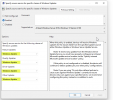
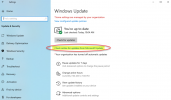
My company uses SCCM for patching, however a handful of users like to manually use the "Check Online for Updates" link that would appear below the traditional "Check for Updates" option when running Windows Update manually on a system that is being patched by SCCM. That option is useful to get the latest drivers which Microsoft publishes or to download/install the MS updates prior to SCCM grabbing and updating the 'update' packages on the DP's. Below is a screen shot of the link that I'm referring to.
I noticed in Windows 11 that option does not appear on my system, although I can override it by changing the following registry key to override the WSUS Update Server which SCCM sets in the registry, then I'm able to use the Microsoft hosted Windows Update provider.
Has anyone else noticed this? Or did Microsoft change where that "Check Online for Updates" option is located in Win11?
I know that by hitting the "Check for Updates" button in Win11 with SCCM/WSUS configured, it will return no results this afternoon after MS released their October updates. Once I changed that registry value and did another update check, it found the October updates and started downloading them from the internet.
Thanks.
I noticed in Windows 11 that option does not appear on my system, although I can override it by changing the following registry key to override the WSUS Update Server which SCCM sets in the registry, then I'm able to use the Microsoft hosted Windows Update provider.
HKEY_LOCAL_MACHINE\SOFTWARE\Policies\Microsoft\Windows\WindowsUpdate\AU, then chnage the "UseWUServer" option to 0
Has anyone else noticed this? Or did Microsoft change where that "Check Online for Updates" option is located in Win11?
I know that by hitting the "Check for Updates" button in Win11 with SCCM/WSUS configured, it will return no results this afternoon after MS released their October updates. Once I changed that registry value and did another update check, it found the October updates and started downloading them from the internet.
Thanks.