Forums on Intune, SCCM, and Windows 11

Welcome to the forums. Register a free account today to become a member! Once signed in, you'll be able to participate on this site by adding your topics and posts, as well as connect with other members through your own private inbox!

SOLVED CCMExec, smstsmgr, CmRcService services disabled during W10 IPU and not reenabled

Status
Not open for further replies.
Messages
5
Reaction score
0
Points
1
Hello, new here!

We have a Task Sequence configured for an OSUpgradePack to take W10 clients to 22H2, this works fine in terms of the upgrade. However once the upgrade is complete the following services are disabled and do not automatically restart:

CCMExec
TSManager
CmRcService

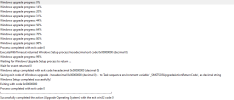
See below a snip from the clients SMSTS.log showing the client exiting provisioning mode and disabling the services, at no other point in the log are the services referenced, I would expect to see them 'Renenabled'
1687518494229.png

Any ideas please?
 
Solution
@lord_arokh Did you ever receive any update from MS for a solution to this? We are encountering the exact same issue with the OS upgrade.
Hi There,

Yes, after months of struggle with MS support teams, it looks like it is a kind of bug.
There is a file called SetupCompleteTemplate.cmd file with in the SCCM client installation folder.
They have provided us an updated copy of this file and just before we perform the UPGRADE OPERATING SYSTEM step, wa added a new step and we created a short PS script to replace the actual file with this updated one. This .CMD file is copied to %Windir%\Setup\Script folder with SetupComplete.cmd name. And later on, it is started by Windows automatically and this helps TSQAgent start and...
So I think we have a fix for this, I have tested successfully on a couple of devices today by adding in a task in the post processing step of the Task Sequence to run a PowerShell script to restart the services. The Smsts.log shows the script being called as part of the TS but does not show the services being reenabled, however they were running on the devices after the upgrade. the PS is:

Set-Service -Name CmRcService -StartupType Automatic
Set-Service -Name ccmexec -StartupType Automatic
Set-Service -Name smstsmgr -StartupType Manual

@Dana this may work for you as well?
 
So I think we have a fix for this, I have tested successfully on a couple of devices today by adding in a task in the post processing step of the Task Sequence to run a PowerShell script to restart the services. The Smsts.log shows the script being called as part of the TS but does not show the services being reenabled, however they were running on the devices after the upgrade. the PS is:

Set-Service -Name CmRcService -StartupType Automatic
Set-Service -Name ccmexec -StartupType Automatic
Set-Service -Name smstsmgr -StartupType Manual

@Dana this may work for you as well?
Thanks Chris, I'll give this a try.
 
Thanks Chris, I'll give this a try.
After adding the powershell to restart the services to my task sequence it worked for two test computers successfully, the 3rd PC didn't resume after the reboot. The services were disabled and in the registry the PC was left in provisioning mode. Not sure why it works for some & others it doesn't.

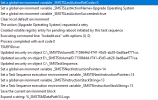
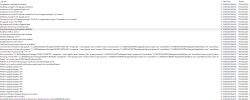
Here's what the log shows:

Screenshot 2023-06-30 105714.png

Screenshot 2023-06-30 105940.png
 
After adding the powershell to restart the services to my task sequence it worked for two test computers successfully, the 3rd PC didn't resume after the reboot. The services were disabled and in the registry the PC was left in provisioning mode. Not sure why it works for some & others it doesn't.

Here's what the log shows:

View attachment 5382

View attachment 5383
Hey Dana,

How is your TS set up? at what point is the script called?
I have the PS script in the post processing section of the TS, if this is the case for you then do you see the script being called in the smsts.log for the device that failed to start services?
 
Hey Dana,

How is your TS set up? at what point is the script called?
I have the PS script in the post processing section of the TS, if this is the case for you then do you see the script being called in the smsts.log for the device that failed to start services?
Hi Chris,

I'm going to test a few more to see if I have the same issues. I do have the PS Script in the post processing section of the TS. I just went back and reviewed the logs on 1 of them and I think the user restarted the PC during the upgrade. I appreciate all your help and getting back to me.
 
Hi Chris,

I'm going to test a few more to see if I have the same issues. I do have the PS Script in the post processing section of the TS. I just went back and reviewed the logs on 1 of them and I think the user restarted the PC during the upgrade. I appreciate all your help and getting back to me.
Ran the TS on my test VM successfully, I can see it run the PS to restart services successfully. I ran the TS on a production PC and after the reboot services were disabled and TS didn't continue with the post processing steps. The only thing that changed was after the reboot the IP address did change. I've manually restarted the TSManager service and the upgrade started again with the same results.
 
Ran the TS on my test VM successfully, I can see it run the PS to restart services successfully. I ran the TS on a production PC and after the reboot services were disabled and TS didn't continue with the post processing steps. The only thing that changed was after the reboot the IP address did change. I've manually restarted the TSManager service and the upgrade started again with the same results.
Can you post your TS?
 
Hi There,

We have the exact same issue in our customer environment.
We are performing IPU to W11 2209 from W10 2109. We saw exact same behavior that, after performing "Upgrade Operating system" step, a restart takes place. After that restart task sequence agent no longer continue to work.
We tried a similar way to restart smstsmgr service. However, we observed that although the task sequence completes till the end, there are no status messages sent back to site. As we don't know what other side effects that this state brings, we did NOT want to take any risk to use our task sequence.

We opened a case at Microsoft, 3 or 4 weeks back. The week before last week, it has been confirmed to us that this is a bug with the product. It seems that the exit code of Upgrade Operating system is not interpreted correctly. Here is the feedback that we received:
The exit code for the restart is not an accepted code for a Task Sequence continuation - so we wipe the Task Sequence startup key and boot into the OS normally.

We are still waiting for a solution.
 
@lord_arokh Did you ever receive any update from MS for a solution to this? We are encountering the exact same issue with the OS upgrade.
Hi There,

Yes, after months of struggle with MS support teams, it looks like it is a kind of bug.
There is a file called SetupCompleteTemplate.cmd file with in the SCCM client installation folder.
They have provided us an updated copy of this file and just before we perform the UPGRADE OPERATING SYSTEM step, wa added a new step and we created a short PS script to replace the actual file with this updated one. This .CMD file is copied to %Windir%\Setup\Script folder with SetupComplete.cmd name. And later on, it is started by Windows automatically and this helps TSQAgent start and continue where it left of. I beleive this is called OSDHook.

It looks like due to some internal mechanics, the one that we originally had was not kicking the TSQAgent.
I cannot upload the file from where I'm currently connected. I'll try to upload it tonight.
 
Solution
Status
Not open for further replies.
Back
Top