

Vavamoose
Member
- Messages
- 5
- Solutions
- 2
- Reaction score
- 0
- Points
- 1
Hi Guys!
I am administering a CAS recovery after a HA SQL cluster failure. The Cluster was dismantled, rebuilt and synced by an DB Admin, but obviously, this broke SCCM. The CAS would not connect pointing to a site recovery to reconnect the CAS to the new HA cluster Listener.
Towards the end, I got the following error on the wizard:
"Setup has encountered fatal errors while installing SMS services. Click the View Log button for more info"
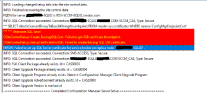
The 'ConfigMgrSetup.log' has the below errors:
"
*** *** Unknown SQL Error!
CSiteControlSetup::Create_BackupSQLCert : Failed to get SSB certificate thumbprint.
CSiteControlSetup::SetupCertificateForSSB : Failed to create/backup SQL SSB certificate.
ERROR: Failed to set up SQL Server certificate for service broker on replica node "Contoso-SQL02" .
"
"Contoso-SQL02" is the secondary node of the HA SQL cluster.
SPN configs have not changed on the Domain
permissions are still same since this issue - rightly configured.
Firewalls are configured OK with appropriate ports.
All activities on the SCCM participating servers are carried out with a single service account.
I will appreciate any recommendations. I suspect DB recovery actions on this SQL02 node were not done with the service account but with a personal Domain Admin account, breaking SQL certs permissions.
I am looking for a way out of this. A little dig around the net points to a DB and Config Manager rebuild, but we are not considering this option yet.
Thanks in advance for all feedback.
I am administering a CAS recovery after a HA SQL cluster failure. The Cluster was dismantled, rebuilt and synced by an DB Admin, but obviously, this broke SCCM. The CAS would not connect pointing to a site recovery to reconnect the CAS to the new HA cluster Listener.
Towards the end, I got the following error on the wizard:
"Setup has encountered fatal errors while installing SMS services. Click the View Log button for more info"
The 'ConfigMgrSetup.log' has the below errors:
"
*** *** Unknown SQL Error!
CSiteControlSetup::Create_BackupSQLCert : Failed to get SSB certificate thumbprint.
CSiteControlSetup::SetupCertificateForSSB : Failed to create/backup SQL SSB certificate.
ERROR: Failed to set up SQL Server certificate for service broker on replica node "Contoso-SQL02" .
"
"Contoso-SQL02" is the secondary node of the HA SQL cluster.
SPN configs have not changed on the Domain
permissions are still same since this issue - rightly configured.
Firewalls are configured OK with appropriate ports.
All activities on the SCCM participating servers are carried out with a single service account.
I will appreciate any recommendations. I suspect DB recovery actions on this SQL02 node were not done with the service account but with a personal Domain Admin account, breaking SQL certs permissions.
I am looking for a way out of this. A little dig around the net points to a DB and Config Manager rebuild, but we are not considering this option yet.
Thanks in advance for all feedback.



