Forums on Intune, SCCM, and Windows 11

Welcome to the forums. Register a free account today to become a member! Once signed in, you'll be able to participate on this site by adding your topics and posts, as well as connect with other members through your own private inbox!

SOLVED Cant access built-in reports after upgrading to SQL server 2022

  • Thread starter Thread starter JT26_KLL
  • Start date Start date
  • Replies Replies 28
  • Views Views 8K
Status
Not open for further replies.

JT26_KLL

New Member
Messages
1
Reaction score
0
Points
1
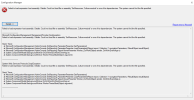
running latest version of SCCM on Server 2022. recently upgraded the SCCM SQL server to SQL server 2022 and in the process had to remove 2016 SQL service reporting and install the independent one. did everything but after the upgrade i cannot access the built-in reports however custom reports load just fine. here is the error i get when i load the report:
2023-06-19_8-54-45.png
 
Same error!.
So the data is likely stored within CM. As such, you need to not only remove the RP but both the component and site system roles from the server. One of them take time to removed. aka 24+ hours, after the others have been removed.
 
No Logs file now, just the same issue... I try to register the DLL on that path, but nothing happens; it says it looks like the DLL is corrupted.
To be 100% clear, you remove the RP. You the waited 24 hours to remove both component and site system roles from the server roles. You ensured that the reg key was removed on RP server. You them installed the RP. You reviewed the logs to install the component on the Site server. Then you reviewed the logs on the RP.

Did you do all of that?
 
To be 100% clear, you remove the RP. You the waited 24 hours to remove both component and site system roles from the server roles. You ensured that the reg key was removed on RP server. You them installed the RP. You reviewed the logs to install the component on the Site server. Then you reviewed the logs on the RP.

Did you do all of that?
No, from the SQL Server: remove the RP and site system? both, wait to remove each 24 hours, remove the key then add it again both roles. OK.. recaping.. ( Didn't catch that)... let me try this...
 
before that, Can i Setup Reporting role in a diferent server?, like Right now
01(ConfMgr) 02 (SQL & RP) & 03 (Wsus), ?
 
Status
Not open for further replies.

Forum statistics

Threads
7,132
Messages
27,852
Members
18,148
Latest member
therealLawrence
Back
Top