Forums on Intune, SCCM, and Windows 11

Welcome to the forums. Register a free account today to become a member! Once signed in, you'll be able to participate on this site by adding your topics and posts, as well as connect with other members through your own private inbox!

SOLVED Cant access built-in reports after upgrading to SQL server 2022

  • Thread starter Thread starter JT26_KLL
  • Start date Start date
  • Replies Replies 28
  • Views Views 8K
Status
Not open for further replies.

JT26_KLL

New Member
Messages
1
Reaction score
0
Points
1
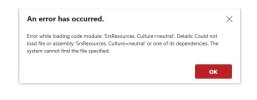
running latest version of SCCM on Server 2022. recently upgraded the SCCM SQL server to SQL server 2022 and in the process had to remove 2016 SQL service reporting and install the independent one. did everything but after the upgrade i cannot access the built-in reports however custom reports load just fine. here is the error i get when i load the report:
2023-06-19_8-54-45.png
 
running latest version of SCCM on Server 2022. recently upgraded the SCCM SQL server to SQL server 2022 and in the process had to remove 2016 SQL service reporting and install the independent one. did everything but after the upgrade i cannot access the built-in reports however custom reports load just fine. here is the error i get when i load the report:

View attachment 5353
i had a similar issue but after upgrading the windows server to 2019. i ended up deleting the reporting server databases and creating a new ones then reconfiguring the reporting service on SCCM. i think your issue is due to the encryption keys not working after the upgrade.
 
Did you remove and readded the reporting point?

Can you access the Website for reporting?
 
Did you remove and readded the reporting point?

Can you access the Website for reporting?
Hello, Garth

I have the same issue, and I have removed and added the Report Point a few times. I can Now Access the Website. Do you have any idea how I can reload these reports?

I added customs reports after Just need to change the DS, but they don't show Up in the SCCM Report List.
 
Last edited:
Hello, Garth

I have this same issue, and I remove and addes the Report Point few times, I do can Access the Website. Any Idea how I can reload this reports.

I added customs reports after Just need to change the DS, but they don't show Up in the SCCM Report List.
How do you upload the report? e.g. did you do it via the web interface? if so read this blog. https://askgarth.com/blog/how-to-setup-an-rdl-for-configmgr/
 
How do you upload the report? e.g. did you do it via the web interface? if so read this blog. https://askgarth.com/blog/how-to-setup-an-rdl-for-configmgr/
Yes, I did upload via the web interface. Thank you will do that now.

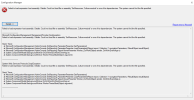
Another thing, I also managed to get the default reports, basically is one that I need desperatly from those, is the \Software Updates\Overall Compliance 1.rdp I try to upload it same as the custom but I get this error.
 

Attachments

  • Screenshot 2025-04-01 090354.jpg
    Screenshot 2025-04-01 090354.jpg
    18.1 KB · Views: 12
Yes, I did upload via the web interface. Thank you will do that now.

Another thing, I also managed to get the default reports, basically is one that I need desperatly from those, is the \Software Updates\Overall Compliance 1.rdp I try to upload it same as the custom but I get this error.
That error is taking about a DDL that can't be loaded. Where is it looking for that DLL? Do you see that DLL on your SSRS server?
 
Yes, I did upload via the web interface. Thank you will do that now.

Another thing, I also managed to get the default reports, basically is one that I need desperatly from those, is the \Software Updates\Overall Compliance 1.rdp I try to upload it same as the custom but I get this error.
Same error?
 
a DLL?, honestly I'm lost there because it doesn't mention it...
The error message clearly states that it can't find a file. That file is used but ConfigMgr for rbac reports. So does it exist?
 
The error message clearly states that it can't find a file. That file is used but ConfigMgr for rbac reports. So does it exist?
After ssrs install, we created new reportdb's, then restored the old report db's and encryption key backup in order to access the original data source definitions. Then we remove the report db's and create new again. Next in url, create the ConfigMgr_JST folder and the 2 datasources under it. Should we need to change the ssrs encryption or delete the content?


image
 
After ssrs install, we created new reportdb's, then restored the old report db's and encryption key backup in order to access the original data source definitions. Then we remove the report db's and create new again. Next in url, create the ConfigMgr_JST folder and the 2 datasources under it. Should we need to change the ssrs encryption or delete the content?


View attachment 7115
Restoring the db will not make the reports work. You need to install the reporting point on this new server. This will install the dlls and config changes that you will need. Just to make your life simpler, I would delete the folder and the datasource before starting the install of the Reporting point.
 
Restoring the db will not make the reports work. You need to install the reporting point on this new server. This will install the dlls and config changes that you will need. Just to make your life simpler, I would delete the folder and the datasource before starting the install of the Reporting point.
OK, by that you mean this:

Remove the role and then add it again. giving it a while to do the job. I'll reply the outcome.
 

Attachments

  • Screenshot 2025-04-03 111059.jpg
    Screenshot 2025-04-03 111059.jpg
    13.7 KB · Views: 2
Last edited:
What does the setup logs for the Reporting Point say?
Hello, Sorry for the time

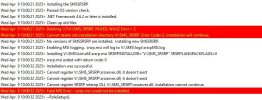
this is the error: the file is missing this one...

weird as you can see is looking for another Root to installed... anything I do still goes to that folder.
after remove the rp role, it deletes that folder( i try creating the folder and copy the file) and back to the same.

That's the srsrpsetup.lorg

V:\SMS_SRSRP\srsserver.dll.

Looks like something is tellin it to install it in that folder...
 

Attachments

  • Screenshot 2025-04-09 110215.jpg
    Screenshot 2025-04-09 110215.jpg
    70.3 KB · Views: 2
Hello, Sorry for the time

this is the error: the file is missing this one...

weird as you can see is looking for another Root to installed... anything I do still goes to that folder.
after remove the rp role, it deletes that folder( i try creating the folder and copy the file) and back to the same.

That's the srsrpsetup.lorg

V:\SMS_SRSRP\srsserver.dll.

Looks like something is tellin it to install it in that folder...
I think it is a reg key that is telling it to go to V:\. Start by removing the RP point. Clean out this reg key. HKEY_LOCAL_MACHINE\SOFTWARE\Microsoft\SMS\SRSRP then reinstall the RP.
 
I think it is a reg key that is telling it to go to V:\. Start by removing the RP point. Clean out this reg key. HKEY_LOCAL_MACHINE\SOFTWARE\Microsoft\SMS\SRSRP then reinstall the RP.
I did, haven't see the folder back in V: SRSS haven got install correct either...
 
Status
Not open for further replies.

Forum statistics

Threads
7,133
Messages
27,858
Members
18,151
Latest member
TonyGTR
Back
Top