Forums on Intune, SCCM, and Windows 11

Welcome to the forums. Register a free account today to become a member! Once signed in, you'll be able to participate on this site by adding your topics and posts, as well as connect with other members through your own private inbox!

PENDING Application marked as NotInstalled right after Installation

Vasily Razumeiko

New Member
Messages
4
Reaction score
0
Points
1
Hello.
I'm trying to deploy MS PowerBI December 2021 QFE 3. sccm.pngThere's written Uninstalling...
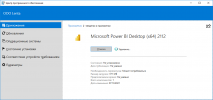
State: Not installed.

Though its installed and working fine.
How to fix this behaviour? It was imported to sccm from MSI automatically.
And its works just fine on one desktop and like above on another.
 
Hey, are you using a third-party tool to deploy that PowerBI update?. Or it is the latest PowerBI installer that you are deploying?.
 
Looks ok to me. Can you share me the link from where you downloaded this installer?. I will test the deployment in my lab.
 
x64 version
I'm using WiX toolset to extract MSI from this exe
dark.exe "path to exe" -x "destination path
Though, as i said, i've tested this app on lab as well, and it worked fine.
Im getting this problem on particular PC
 
Looks ok to me. Can you share me the link from where you downloaded this installer?. I will test the deployment in my lab.
Hi @Prajwal Desai
Can anyone advice, i try to deploy powerbi.exe from sccm but always fail. i can install using the cmd.But SCCM not able to install.
MsiExec.exe /X{8739e315-610f-423e-80d3-7951db3a05a4} - Uninstall working fine

PBIDesktopSetup_x64.exe -q -norestart ACCEPT_EULA=1 - not work
PBIDesktopSetup_x64.exe -quiet LANGUAGE=de-DE ACCEPT_EULA=1 - not work
PBIDesktopSetup_x64.exe -s -norestart ACCEPT_EULA=1 - not work
 
Hi @Prajwal Desai
Can anyone advice, i try to deploy powerbi.exe from sccm but always fail. i can install using the cmd.But SCCM not able to install.
MsiExec.exe /X{8739e315-610f-423e-80d3-7951db3a05a4} - Uninstall working fine

PBIDesktopSetup_x64.exe -q -norestart ACCEPT_EULA=1 - not work
PBIDesktopSetup_x64.exe -quiet LANGUAGE=de-DE ACCEPT_EULA=1 - not work
PBIDesktopSetup_x64.exe -s -norestart ACCEPT_EULA=1 - not work
For clarity, you tested the command line with the local system account. https://www.recastsoftware.com/resources/how-to-access-the-local-system-account/
 
Back
Top
