Hello All,
I'm experiencing some frustrating issues on the installation phase for one DMZ Server and ironically for the Management Point.
I have a DMZ Server with only 1 pubblic IP configured (boundaries should be ok even if there's some overlapping with the IP Range configured); all TCP/UDP ports have been opened and we also tried to completely disable both Company and Local Firewall during a setup without any progress.
From the registry it seems that all parameters are correctly acquired, here is the command launched during installation:
CCMSetup.exe /UsePKICert CCMHTTPSPORT=443 /NoCRLCheck /mp:https://MP_FQDN CCMCERTSEL="Subject:ServerName" SMSSITECODE=XXX SMSMP=MP_FQDN FSP=MP_FQDN DNSSUFFIX=MyDomain CCMDEBUGLOGGING=1 CCMLOGLEVEL=0 CCMLOGMAXHISTORY=3 CCMLOGMAXSIZE=5242880
Personal certificate for Client Authentication and Root and Intermediate Certificates have been correctly imported on Server.
CCM.log is not showing messages for the Server while local CCMSetup.log is reporting these:
IsSslClientAuthEnabled - Determining provisioning mode state failed with 80070002. Defaulting to state of 448. ccmsetup 10/11/2021 13:36:16 8592 (0x2190)
Using the certificate [Thumbprint XXXXXXXXECFAD0C6F0XXXXXXXXXXX] issued to 'ServerName'. ccmsetup 10/11/2021 13:36:16 8592 (0x2190)
ccmsetup: Host=MP_FQDN, Path=/SMS_DP_SMSPKG$/SCC00002, Port=443, Protocol=https, CcmTokenAuth=0, Flags=0x60308, Options=0x1c0 ccmsetup 10/11/2021 13:36:16 8592 (0x2190)
Enable impersonation over HTTPS for MP_FQDN. ccmsetup 10/11/2021 13:36:16 8592 (0x2190)
Created connection on port 443 ccmsetup 10/11/2021 13:36:16 8592 (0x2190)
Trying without proxy. ccmsetup 10/11/2021 13:36:16 8592 (0x2190)
No client patches are detected. ccmsetup 10/11/2021 13:36:16 8592 (0x2190)
IsSslClientAuthEnabled - Determining provisioning mode state failed with 80070002. Defaulting to state of 448. ccmsetup 10/11/2021 13:36:16 8592 (0x2190)
Client is on internet ccmsetup 10/11/2021 13:36:16 8592 (0x2190)
and also this message
Could not retrieve value for MDM_ConfigSetting . Error 0x80041013
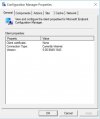
Instead of usual Configuration Manager properties (Assigned MP, Client Certificate, SiteCode etc.), the result is always the one in attachment (AgentDMZ.JPG).
Last but not least, after introducing HTTPS communication i have noticed that MP is the only Server which is not able to use Certificate we autoenroll with GPOs, even with manual installation it shows Client Certificate: none.
Every clue/tip will be much more than welcome.
Regards,
Andrea
I'm experiencing some frustrating issues on the installation phase for one DMZ Server and ironically for the Management Point.
I have a DMZ Server with only 1 pubblic IP configured (boundaries should be ok even if there's some overlapping with the IP Range configured); all TCP/UDP ports have been opened and we also tried to completely disable both Company and Local Firewall during a setup without any progress.
From the registry it seems that all parameters are correctly acquired, here is the command launched during installation:
CCMSetup.exe /UsePKICert CCMHTTPSPORT=443 /NoCRLCheck /mp:https://MP_FQDN CCMCERTSEL="Subject:ServerName" SMSSITECODE=XXX SMSMP=MP_FQDN FSP=MP_FQDN DNSSUFFIX=MyDomain CCMDEBUGLOGGING=1 CCMLOGLEVEL=0 CCMLOGMAXHISTORY=3 CCMLOGMAXSIZE=5242880
Personal certificate for Client Authentication and Root and Intermediate Certificates have been correctly imported on Server.
CCM.log is not showing messages for the Server while local CCMSetup.log is reporting these:
IsSslClientAuthEnabled - Determining provisioning mode state failed with 80070002. Defaulting to state of 448. ccmsetup 10/11/2021 13:36:16 8592 (0x2190)
Using the certificate [Thumbprint XXXXXXXXECFAD0C6F0XXXXXXXXXXX] issued to 'ServerName'. ccmsetup 10/11/2021 13:36:16 8592 (0x2190)
ccmsetup: Host=MP_FQDN, Path=/SMS_DP_SMSPKG$/SCC00002, Port=443, Protocol=https, CcmTokenAuth=0, Flags=0x60308, Options=0x1c0 ccmsetup 10/11/2021 13:36:16 8592 (0x2190)
Enable impersonation over HTTPS for MP_FQDN. ccmsetup 10/11/2021 13:36:16 8592 (0x2190)
Created connection on port 443 ccmsetup 10/11/2021 13:36:16 8592 (0x2190)
Trying without proxy. ccmsetup 10/11/2021 13:36:16 8592 (0x2190)
No client patches are detected. ccmsetup 10/11/2021 13:36:16 8592 (0x2190)
IsSslClientAuthEnabled - Determining provisioning mode state failed with 80070002. Defaulting to state of 448. ccmsetup 10/11/2021 13:36:16 8592 (0x2190)
Client is on internet ccmsetup 10/11/2021 13:36:16 8592 (0x2190)
and also this message
Could not retrieve value for MDM_ConfigSetting . Error 0x80041013
Instead of usual Configuration Manager properties (Assigned MP, Client Certificate, SiteCode etc.), the result is always the one in attachment (AgentDMZ.JPG).
Last but not least, after introducing HTTPS communication i have noticed that MP is the only Server which is not able to use Certificate we autoenroll with GPOs, even with manual installation it shows Client Certificate: none.
Every clue/tip will be much more than welcome.
Regards,
Andrea