mathiasottsen
Member
- Messages
- 5
- Reaction score
- 0
- Points
- 1
Hi,
Currently having issues doing PXE boot on my test VM environment.
It goes through the first process of loading the boot image and is about to load task sequence but then stops.
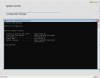
If i press F8 i'm able to ping my DP/MP however i get an error in smsts.log that it "Failed to select MP" and "Failed to run from PXE in WinPE""
I have tried to test with the domain admin for network access account to verify that it wasn't the service account but it didn't help.
I've tried to create a new boundary with the IP subnet instead of 192.168.68.0/24
I've followed your article regarding firewall policies: https://www.prajwaldesai.com/config...ions/#Configure_SCCM_2012_Firewall_Exceptions
I've deployed the TS to all unknown devices with boot image x64 and made available for PXE.
Any ideas of what's going wrong?
Currently having issues doing PXE boot on my test VM environment.
It goes through the first process of loading the boot image and is about to load task sequence but then stops.
If i press F8 i'm able to ping my DP/MP however i get an error in smsts.log that it "Failed to select MP" and "Failed to run from PXE in WinPE""
I have tried to test with the domain admin for network access account to verify that it wasn't the service account but it didn't help.
I've tried to create a new boundary with the IP subnet instead of 192.168.68.0/24
I've followed your article regarding firewall policies: https://www.prajwaldesai.com/config...ions/#Configure_SCCM_2012_Firewall_Exceptions
I've deployed the TS to all unknown devices with boot image x64 and made available for PXE.
Any ideas of what's going wrong?