Forums on Intune, SCCM, and Windows 11

Welcome to the forums. Register a free account today to become a member! Once signed in, you'll be able to participate on this site by adding your topics and posts, as well as connect with other members through your own private inbox!

PENDING After 2107 Upgrade + Hotfix SMS_Executive Service keeps stopping

Crimson_Ghost

Member
Messages
11
Reaction score
1
Points
3
I have premier support and have an incident open with MS. However after 12 hours of troubleshooting have no answers. Reinstalling components fixes it for a few hours. I have checked ADR rules on our SQL DB, nothing is set to enabled. There is however an extra rule in the DB table that I can't see in the Cm console. The installs passed the Pre-Req and all installed fine. The only warning is the SQL 2012 end of life July. I have crash dump logs and smsexec logs and sitecomp. None show me or the MS engineer anything useful. The SMS_Executive service just wont stay running. I am turning to this board as I have been a lurker for years. Help me Prajwal Desai, you're my only hope.
 
While I am an admin I was not the architect. Unfortunately I have learned through this issue a lot of bad things that were decided before me.

-We currently do not do any backups of our configuration manager outside VM backup.

Troubleshooting steps done so far
-Checked ADR rules in SQL DB. Verified none were enabled
-Reinstalled components without configuration.
-verified IIS cert
-ran procmon // procmondump which shows.
Unhandled: C0000005.ACCESS_VIOLATION
-removed anti virus
-rebooted sql server (which is standalone). Verified space 4.8 GB free

How do i Check the inbox Manager. Read somewhere SMS Exec might just be overwhelmed by queued messages. NOt sure how to check this.
Does the SQL server need .NEt 4.6.2/4.8? Maybe that is an issue?
 
Last edited:
1 Primary Site server (1 box), 1 DP (1 box), SQL server stand alone server (1 Box). Everything is 2012 R2.
 
Last edited:
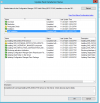
I have been working with MS. The smsexec service is more stable now running 2-3 hours at at a time. We changed some permissions adding machine account (computer name) to administrators group and adding a Domain SQL service account to administrators group on the sql server. Not really any explanation why this made things seem to work longer. However it looks like the install dates of my hotfix changed and some components are still installed with warnings. If I could get these to turn green I would feel much better about the state of my environment.

1638064752267.png
 
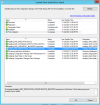
Some updates. It seems that the SMS_SERVER_BOOTSTRAP service continues to kick on and keeps reinstalling all of the components. This keeps looping. and seems to coincide with when the SMS Exec service keeps being stopped and unable to run until for some reason it works again for 2 hours. Its some cycle that keeps happening. one MS support person was saying this service shouldn't keep running unless its trying to install an upgrade. Any ideas what to look for . The smsexec and sitecomp logs are basically useless.

1638137323473.png
 
Hi Crimson,
I performed a upgrade to SCCM 2107 and was facing a similar issue of components trying to install on a daily basis and when i tried to upgrade the sccm 2107 hotfix the upgrade failed giving a generic error. Can you let me know if there is any update from MS on this.
 
Ive been told they have seen this before all caused by Anti Virus, which we removed 4days , 40 hours ago. I guess im a 1 of 1 right now.
 
Hi Crimson,
I performed a upgrade to SCCM 2107 and was facing a similar issue of components trying to install on a daily basis and when i tried to upgrade the sccm 2107 hotfix the upgrade failed giving a generic error. Can you let me know if there is any update from MS on this.
Is your environment running stable? Mine is still not fixed.
 
No its not stable, i am trying to get the av exclusions in place and see if it fixes as there were recent changes in antivirus in the environment.
 
I removed AV form this environment 6 days ago. Nothing helped. I'm 50+ hours of support now with MS. Its like the system is lagging or behind from so many client requests (not that we have a lot 1700 only). This is just a guess but it seems like every 12 hours things work for a short time, then stop again. Remote control, imagining and existing software deployments still work. This is incredibly frustrating. Is there a rebuild plan that will not create more work or cause me to touch 1700 end point devices? MS has not offered up any legitimate rollback option available.
 
I removed AV form this environment 6 days ago. Nothing helped. I'm 50+ hours of support now with MS. Its like the system is lagging or behind from so many client requests (not that we have a lot 1700 only). This is just a guess but it seems like every 12 hours things work for a short time, then stop again. Remote control, imagining and existing software deployments still work. This is incredibly frustrating. Is there a rebuild plan that will not create more work or cause me to touch 1700 end point devices? MS has not offered up any legitimate rollback option available.
Ah this worries me , Have opened a case with Microsoft and yet to hear from them. Will keep you posted.
 
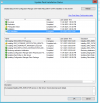
One interesting thing i noticed. If i try to restart the site_component_manager service. It crashes with a 1053 error. I reboot. The service restarts. Config manager tries to reinstall And SMS_executive service runs fine. At some point the config manager thinks all the components are installed and sms_executive stops running. If i try to restart sms_exec it stops instantly.


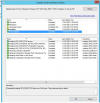
When the sms_executive service runs this installation status changes. These were all green prior to me restarting the site_component_manager service. So is there some upgrade file that after installation is not telling the service the upgrade finished successfully. It is just very strange that restarting site_comp service kicks off the reinstall and they get stuck almost


1638375474602.png


Prior to restarting sms_site_component_manager

1638375621695.png
 
May have found the cause. Look for a DLL in \Program Files\Microsoft Configuration Manager\bin\X64. failovermgr.dll. Rename this .old or delete. Then start sms_executive. My system has been stable 3+ hours since. Will follow up tomorrow, but i think this is it.
 
@Crimson_Ghost - Any update on the issue ?.
My issue is resolved. My system has been stable now for almost a week. I am still confused and have not been given any answers why this failovermgr.dll was causing issues with this update. Even after renaming it, the file was not recreated. MS is unable to provide any information on the issue. It does make me nervous for a future update, or if that DLL is actually needed for something.
 

Forum statistics

Threads
7,165
Messages
27,967
Members
18,269
Latest member
alexshem

Trending content

Back
Top