
Hi,
i am going to use SCCM 2012 to deploy Win10 and i have all done except editing registry in task sequence.
I have tried to add a "Run Command Line" step on various places. Before Setup Windows and Configuration Manager and after but nothing changes. The reg keys were not added.
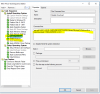
The commandds were:
Disable download
reg add HKEY_LOCAL_MACHINE\SOFTWARE\Policies\Microsoft\WindowsStore /v AutoDownload /t REG_DWORD /d 2 /f
Disable features
reg add "HKEY_LOCAL_MACHINE\SOFTWARE\Policies\Microsoft\Windows\Cloud Content" /v DisableWindowsConsumerFeatures /t REG_DWORD /d 1 /f
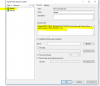
Then i create a task sequence with only two staeps that run the same commands, i deplooyed it to the device and it works fine so i think that the syntax was correct and perhaps the place is wrong.
Can someone help me?
i've attached smsts.log
i am going to use SCCM 2012 to deploy Win10 and i have all done except editing registry in task sequence.
I have tried to add a "Run Command Line" step on various places. Before Setup Windows and Configuration Manager and after but nothing changes. The reg keys were not added.
The commandds were:
Disable download
reg add HKEY_LOCAL_MACHINE\SOFTWARE\Policies\Microsoft\WindowsStore /v AutoDownload /t REG_DWORD /d 2 /f
Disable features
reg add "HKEY_LOCAL_MACHINE\SOFTWARE\Policies\Microsoft\Windows\Cloud Content" /v DisableWindowsConsumerFeatures /t REG_DWORD /d 1 /f
Then i create a task sequence with only two staeps that run the same commands, i deplooyed it to the device and it works fine so i think that the syntax was correct and perhaps the place is wrong.
Can someone help me?
i've attached smsts.log


