Forums on Intune, SCCM, and Windows 11

Welcome to the forums. Register a free account today to become a member! Once signed in, you'll be able to participate on this site by adding your topics and posts, as well as connect with other members through your own private inbox!

PENDING 0x800702E4(-2147024156) - Software Error

  • Thread starter Thread starter harveybham
  • Start date Start date
  • Replies Replies 2
  • Views Views 16K

harveybham

Well-Known Member
Messages
86
Solutions
1
Reaction score
5
Points
8
Hi All

I have a software which is getting the error code 0x800702E4(-2147024156)

It is failing due to the app being installed as a user rather than system. The User does not have enough admin access hence why it is failing

This app needs to be installed as the required user in order for it to work, I do not want to give the users local admin rights on the pc, is there anyway around this using sccm ?
 
This app needs to be installed as the required user
That's your problem, that legacy thing you're trying to jump through hoops to accommodate. Why? Why does that application have to be installed by a specific user? How many other applications today have that requirement?

Software installation must be performed by an account with administrative access, no way around it. You basically have three four options:
  1. Have an admin do it manually every time.
  2. Wrap the install in a script that temporarily gives the user admin and revokes it after completion (horrible idea).
  3. Select different software that doesn't suffer legacy issues.
  4. Dive deeper into that rabbit hole and find a way to install the application with your standard admin account and make post-adjustments so the program does what it needs to for the user.
 
Last edited:
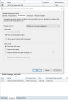
Head to Application Management -> Packages, and select the package in question. Select the Package in question and go the programs tab in the bottom of the window. Right click the package in the bottom and go to the environment tab.

Set the program to install whether or not a user is logged on.

Capture2020430.PNG
 
Back
Top