Forums on Intune, SCCM, and Windows 11

Welcome to the forums. Register a free account today to become a member! Once signed in, you'll be able to participate on this site by adding your topics and posts, as well as connect with other members through your own private inbox!

PENDING Configuration manager cannot connect to the site

Milan Nagda

Member
Messages
8
Reaction score
0
Points
1
Hi Everyone,

I have joined a new organisation and there is a huge deployment that needs to happen of Windows images.

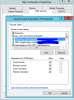
I tried accessing the SCCM, but for some reason it's not letting me connect to the site. I have attached the screenshots as well. checked the Decomconfg and I confirmed that SMSAdmin has full rights. Even if I logon as admin, it gives me the same problem.

The user account running the Configuration Manager console has insufficient permissions to read information from the Configuration Manager site database. The account must belong to a security role in Configuration Manager. The account must also have the Windows Server Distributed Componenet Object Model (DCOM) Remote Activation permission for the computer running the Configuration Manager site server and the SMS Provider.

Advise needed.

Thanks,
 

Attachments

  • 1.PNG
    1.PNG
    55.6 KB · Views: 126
  • 2.PNG
    2.PNG
    21.1 KB · Views: 134
From the log file I see the following errors -

Transport error; failed to connect, message: 'The user account running the Configuration Manager console has insufficient permissions to read information from the Configuration Manager site database. The account must belong to a security role in Configuration Manager. The account must also have the Windows Server Distributed Component Object Model (DCOM) Remote Activation permission for the computer running the Configuration Manager site server and the SMS Provider.'\r\nMicrosoft.ConfigurationManagement.ManagementProvider.SmsConnectionWithDetailException\r\nThe user account running the Configuration Manager console has insufficient permissions to read information from the Configuration Manager site database. The account must belong to a security role in Configuration Manager. The account must also have the Windows Server Distributed Component Object Model (DCOM) Remote Activation permission for the computer running the Configuration Manager site server and the SMS Provider.\r\n at Microsoft.ConfigurationManagement.AdminConsole.SmsSiteConnectionNode.ValidateConnectionParameters(ConnectionManagerBase connection)

at Microsoft.ConfigurationManagement.AdminConsole.SmsSiteConnectionNode.GetConnectionManagerInstance(String connectionManagerInstance)\r\nNo details are available for this error.\r\n

The user account that you are using, check if it is added as Administrative User from console:
Check Administration->Security->Administrative Users and make him a member of the required security role.
Note: He should have the Site Read permission included…

If you are not able to verify this, you must check with the anyone who has access to configuration manager console.
 
Hi Prajwal,
The problem is it does not let me do anything on the console. As soon as I start it, it tries to connect to the site and gives me that error. I cannot access anything else from the console. Is there any other way I can get to it.
The other problem is, the previous SD guy has left 2-3 months ago without any proper handover. Now everyone is lost on how to go about the deployment. My suggestion was to get it done through SCCM but I can't even access the console. We are delayed on WSUS updates to be pushed on the network as well. It would be a great help if you can help me get over this. Is there any other way we can do the deployment ?
 
I checked the title bar and it says it is connected. Tried entering the Administrator tab from the address bar but nothing happen. Attaching the ss
 

Attachments

  • 3.PNG
    3.PNG
    47.9 KB · Views: 43
Hi Milan, what was the account used to install the SQL server. Do you have access to SQL server (Configuration Manager DB) ?. How come only one guy had access to configuration manager console ?.
 
Hi Prajwal,
Apologies for late response. I can access SQL Server Configuration Manager(Local) is that's what you are asking for. I have no clue how everything is setup here. The last guy knew everything and now he is gone without a proper handover. That's why all the struggle. I am struggling to even push the updates through the network as I can't access SCCM and no one here has any clue about it.
 
I mean have you got access to SCCM DB ?. What happened to the user account of the guy who left the company, if its still existing you can reset his password and use the same account to gain access to SCCM (provided you should know what account he had used).
 
There's the catch, I cannot see anything in SCCM console except the screenshot. would not let me explore anywhere. I tried resetting the account of the previous user, but it does not work. So i got no clue on how I can access SCCM because the others didn't had any clue as well.
 
Does anyone have any clue on this issue?
I am also having the same kind of error. My Admin account is getting this error
I am not able to access the Console with my built-in admin account.
 
Does anyone have any clue on this issue?
I am also having the same kind of error. My Admin account is getting this error
I am not able to access the Console with my built-in admin account.
Exactly what troubleshooting have you done?
 
Thank you for replying.
I have checked all the domain admin access given to admin user account. It is having access under Administrator , Sms providers.
In AdminUi log found that insufficient access to open the console.
Also fount that I can't login to SSMS also.
Problem is that , I have created the SQL server and config console everything with this account in one server for practicing . And I can use it smoothly in past.
But when I open the server with another admin account, it didn't connect , also the main admin account didn't connect after that.
Let me know any other troubleshooting steps
 
Thank you for replying.
I have checked all the domain admin access given to admin user account. It is having access under Administrator , Sms providers.
In AdminUi log found that insufficient access to open the console.
Also fount that I can't login to SSMS also.
Problem is that , I have created the SQL server and config console everything with this account in one server for practicing . And I can use it smoothly in past.
But when I open the server with another admin account, it didn't connect , also the main admin account didn't connect after that.
Let me know any other troubleshooting steps
if you can't get into SQL using the admin account that created the SQL instance, then you will have likely have problems. check that SQL is healthy and working correctly and that you can access it.
 
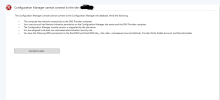
Hi Everyone, I have a problem with connecting to the site in the SCCM console about two weeks ago and I don't know what the issue is, this was working perfectly and smoothly. I checked the WMI permissions required for ConfigMng SCCM console and it's ok, check NetBIOS over Tcpip, and its enabled, I checked permissions on the installation folder also and it's ok, I tried to connect to the SQL server using SQL server management studio and also ok, I try to connect using IP address to eliminate the problem with DNS, and noting changed, i got the same error. I try to uninstall/change the Configuration manager setup via Control panel but the option is blank, isn't avilible, so the option for repair isn't available. I also rebuilt WMI repository with the script:
net stop winmgmt
winmgmt /salvagerepository windir\System32\wbem
winmgmt /resetrepository windir\System32\wbem
and this also doesn't work for me. I started the SQL server agent, although I don't know if they were started before the error or not, I checked the firewall ports. they are okay, I tried to close the firewall and try it again, but that also doesn't work for me, I tried to troubleshoot SMS namespace connectivity and server connectivity, and that is okay, I also checked DCOM security settings. When I push nslookup using cmd, for the default server, it says localhost, I don't know if is that important. I'm stuck, i don't have very much experience with sccm, and this is my first time setting environment for sccm..I will attach photo from the SCCM console error and paste the UIlog.
[1, PID:6664][12/19/2023 10:46:24] : Transport error; failed to connect, message: 'The SMS Provider reported an error.'\r\nMicrosoft.ConfigurationManagement.ManagementProvider.WqlQueryEngine.WqlQueryException\r\nThe SMS Provider reported an error.\r\n at Microsoft.ConfigurationManagement.ManagementProvider.WqlQueryEngine.WqlQueryResultsObject.<GetEnumerator>d__75.MoveNext()
at Microsoft.ConfigurationManagement.ManagementProvider.WqlQueryEngine.WqlConnectionManager.Connect(String configMgrServerPath)
at Microsoft.ConfigurationManagement.AdminConsole.SmsSiteConnectionNode.GetConnectionManagerInstance(String connectionManagerInstance)\r\nConfigMgr Error Object:
instance of __ExtendedStatus
{
Operation = "ExecQuery";
ParameterInfo = "SELECT * FROM SMS_Site WHERE SiteCode = 'XXX'";
ProviderName = "WinMgmt";
};

Error Code:
ProviderLoadFailure
\r\nSystem.Management.ManagementException\r\nProvider load failure \r\n at System.Management.ManagementException.ThrowWithExtendedInfo(ManagementStatus errorCode)
at System.Management.ManagementObjectCollection.ManagementObjectEnumerator.MoveNext()
at Microsoft.ConfigurationManagement.ManagementProvider.WqlQueryEngine.WqlQueryResultsObject.<GetEnumerator>d__75.MoveNext()\r\nManagementException details:
instance of __ExtendedStatus
{
Operation = "ExecQuery";
ParameterInfo = "SELECT * FROM SMS_Site WHERE SiteCode = 'XXX'";
ProviderName = "WinMgmt";
};
\r\n
[2, PID:6664][12/19/2023 10:46:27] :System.Management.ManagementException\r\nProvider load failure \r\n at System.Management.ManagementException.ThrowWithExtendedInfo(ManagementStatus errorCode)
at System.Management.ManagementObject.InvokeMethod(String methodName, ManagementBaseObject inParameters, InvokeMethodOptions options)
at Microsoft.ConfigurationManagement.ManagementProvider.WqlQueryEngine.WqlConnectionManager.ExecuteMethod(String methodClass, String methodName, Dictionary`2 methodParameters, Boolean traceParameters)\r\nManagementException details:
 

Attachments

  • Screenshot_1.png
    Screenshot_1.png
    100.1 KB · Views: 8
Did you try all the suggestion listed in the error message?
Are you doing this locally or remotely to configmgr?
Is SQL healthy? is SQL local to ConfigMgr?
Have you reviewed the logs for errors?
 
Did you try all the suggestion listed in the error message?
Yes, i check everything listed in the error, one by one and all looks fine.
Are you doing this locally or remotely to configmgr?
Locally
Is SQL healthy? is SQL local to ConfigMgr?
Yes, I have an SQL server and Configuration manager on the same server. They aren't dedicated, I have only one machine and another child PC.
Have you reviewed the logs for errors?
Which logs i should see, is there any specific? I see the admin UI log, before this, when I was setup the configuration manager I saw other logs, but now I don't see it because this all worked well until two weeks ago.
Only for information, I also check the storage of the databases, there is enough storage, so I eliminate that as a problem.
 

Forum statistics

Threads
7,136
Messages
27,873
Members
18,159
Latest member
jordysmits
Back
Top