Forums on Intune, SCCM, and Windows 11

Welcome to the forums. Register a free account today to become a member! Once signed in, you'll be able to participate on this site by adding your topics and posts, as well as connect with other members through your own private inbox!

SOLVED Client is active on SCCM console but considered as offline when I want to manipulate it

  • Thread starter Thread starter sclmi
  • Start date Start date
  • Replies Replies 11
  • Views Views 13K
Status
Not open for further replies.

sclmi

Member
Messages
24
Solutions
1
Reaction score
2
Points
3
I give up googling for a solution and turn to you for help to solve my problem.
Actually, I have installed a sccm server and set up some clients. My sccm manager console shows clients as active but I cannot initiate any action on them. I always get message telling that the action cannot be performed because client is offline.
I cannot understand why an active client can be offline.

Thanks in advance
 
Solution
Hi guys,

Thanks for your enthusiams to help me. Finally, I have been able to correct this problem.
I share here the sulution (if it can be taken as a solution and not a misconfiguration).
I got these problems because my server was not able to authenticate my clients in my AD. I corrected it by adjusting the profile used to contact my AD in order to give reading access on its forest.
Now I can manage clients from the console.
I give up googling for a solution and turn to you for help to solve my problem.
Actually, I have installed a sccm server and set up some clients. My sccm manager console shows clients as active but I cannot initiate any action on them. I always get message telling that the action cannot be performed because client is offline.
I cannot understand why an active client can be offline.

Thanks in advance
Exactly what action are you doing? Where are you getting this message?
 
Exactly what action are you doing? Where are you getting this message?
Hi Garth,

Thanks for you reply.
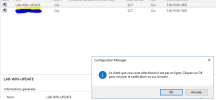
I am getting this message for every action I do. In attach an example I got when trying to reboot a client. Unfortunately, it is in french andsccm-issue.PNG telling that the client is offline
 
Hi Garth,

Thanks for you reply.
I am getting this message for every action I do. In attach an example I got when trying to reboot a client. Unfortunately, it is in french andView attachment 5325 telling that the client is offline
When was it's last policy request? When was its last HW inv? is the client healthy? Is port 10123 TCP open on the MP server? Is you MP healthy? Are you usign IP range boundaries only?
 
When was it's last policy request? When was its last HW inv? is the client healthy? Is port 10123 TCP open on the MP server? Is you MP healthy? Are you usign IP range boundaries only?
Hi Garth,
To reply to your questions :
- last policy request : this morning. I did it manually
- last HW inv : today.
- client healthy : yes
- port 10123 TCP : not open. Checked with nmap
- MP healthy : yes
- ip range boundary only : yes

If further detail needed, let me know it.

Thanks and egards
 
Hi Garth,
To reply to your questions :
- last policy request : this morning. I did it manually
- last HW inv : today.
- client healthy : yes
- port 10123 TCP : not open. Checked with nmap
- MP healthy : yes
- ip range boundary only : yes

If further detail needed, let me know it.

Thanks and egards
For Policy request, are you using the data getting update in CM console? Same Q for Hw inv.
port 10123 is on your MP and it needs to be open for the online status to work. You should see an error within the logs on the client about this.
 
For Policy request, are you using the data getting update in CM console? Same Q for Hw inv.
port 10123 is on your MP and it needs to be open for the online status to work. You should see an error within the logs on the client about this.
Noted for port 10123.
For policy request, I did it twice as recommeded here.
For HW Inv, I did it in CM console.

Regarding logs, I have lots of errors with which I am a bit lost.
 
For Policy request, are you using the data getting update in CM console? Same Q for Hw inv.
port 10123 is on your MP and it needs to be open for the online status to work. You should see an error within the logs on the client about this.
Hi Garth,
I come back to you as I have opened port 10123 on my MP. But I am still getting error messages on my logs and my devices are still inactive.

Really need help to go forward.

Thanks in advance
 
a question mark means there is no communication between the client and your server. are you using DNS name or ip address for your management point ?
do you see the management point address in the cm client in control panel
 
Hi guys,

Thanks for your enthusiams to help me. Finally, I have been able to correct this problem.
I share here the sulution (if it can be taken as a solution and not a misconfiguration).
I got these problems because my server was not able to authenticate my clients in my AD. I corrected it by adjusting the profile used to contact my AD in order to give reading access on its forest.
Now I can manage clients from the console.
 
Solution
Status
Not open for further replies.

Forum statistics

Threads
7,133
Messages
27,860
Members
18,151
Latest member
TonyGTR
Back
Top