Forums on Intune, SCCM, and Windows 11

Welcome to the forums. Register a free account today to become a member! Once signed in, you'll be able to participate on this site by adding your topics and posts, as well as connect with other members through your own private inbox!

NEW PowerBi.exe file issue

  • Thread starter Thread starter Nitin_ted
  • Start date Start date
  • Replies Replies 19
  • Views Views 6K

Nitin_ted

Well-Known Member
Messages
87
Solutions
1
Reaction score
2
Points
8
Hello Guys,
Since there is no msi powerBi available I have difficulty deploying .exe. I can install powerbi.exe from Powershell with no issue but i am not able to deploy from SCCM. Can anyone please advise ?

Uninstall Program (Below)
MsiExec.exe /X{8739e315-610f-423e-80d3-7951db3a05a4} - Uninstall working fine

Install Program (Below),(Doesn't work)
PBIDesktopSetup_x64.exe -q -norestart ACCEPT_EULA=1 -
PBIDesktopSetup_x64.exe -quiet LANGUAGE=en-US ACCEPT_EULA=1
PBIDesktopSetup_x64.exe -s -norestart ACCEPT_EULA=1

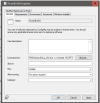
User Experience
Install for system
Whether or not a user logged on
Hide

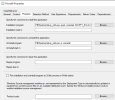
Detection Rule
Registry- SOFTWARE\Microsoft\Windows\CurrentVersion\Uninstall\{8739e315-610f-423e-80d3-7951db3a05a4}
Value- DisplayVersion
Data Type- String
Enabled- This Registry setting must be exit on the target system.....
 
Yes. local account or domain account no issue when i use powershell to install and uninstall.
I'm sorry to ask this again but this is important to know, for 100% clarity, you used the Local system account. Not a local account but local system account. e.g. you use psexec to access the local system account.
 
Last edited:
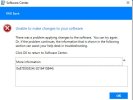
it shows the installation succeeded but the detection failed. sounds as a dumb question but did you check under c:\program files\.....
did you try to deploy the 32 bits version of powerbi ?
@AhmedLS
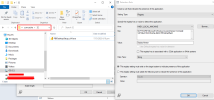
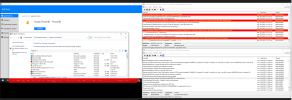
No, its 64Bits and its not in my Program files. I can see its been deploy to my cache folder but its not installing. Detection failed but its looks good (find attached).

used Registry (UninstallString) (Mentioned above)
After manually installed i able to uninstall PowerBi from software center no issue.
 

Attachments

  • Screenshot_1.png
    Screenshot_1.png
    69.8 KB · Views: 9
  • Screenshot_2.png
    Screenshot_2.png
    23.1 KB · Views: 9
@AhmedLS
No, its 64Bits and its not in my Program files. I can see its been deploy to my cache folder but its not installing. Detection failed but its looks good (find attached).

used Registry (UninstallString) (Mentioned above)
After manually installed i able to uninstall PowerBi from software center no issue.
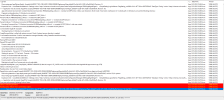
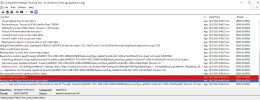
would you post the execmgr.log or the part where it tries installing the powerbi
 
you can try to run the installer manually from software center and see if it shows up in execmgr.log
I tried but its not showing. Can you try to deploy PowerBi from your console to test machine and see if its working? i check on few sites many people facing same issue.
 
I tried but its not showing. Can you try to deploy PowerBi from your console to test machine and see if its working? i check on few sites many people facing same issue.
i just deployed the x64 version of powerbi desktop and it worked with no issues. execmgr.log showed the command line and the success results.
are you checking execmgr on the client ? 1685102632311.png
1685102584087.png
 
i just deployed the x64 version of powerbi desktop and it worked with no issues. execmgr.log showed the command line and the success results.
are you checking execmgr on the client ? View attachment 5289
View attachment 5288

@AhmedLS
i try the package, But something is not right here as well. From the Software Center its shows it's installed. Program and feature nothing. Check my C drive i got nothing too.
execmgr,log showed me powerbi now.
 

Attachments

  • Screenshot_2.png
    Screenshot_2.png
    271.5 KB · Views: 3
  • Screenshot_3.png
    Screenshot_3.png
    70.8 KB · Views: 2
@AhmedLS
i try the package, But something is not right here as well. From the Software Center its shows it's installed. Program and feature nothing. Check my C drive i got nothing too.
execmgr,log showed me powerbi now.
try do deploy the 32bits app instead just to test.
 
Since 64bit having an issue, i'm going with x86 since this installer has no issue from scc

what microsoft office are you running on your devices. if you running microsoft office x86 then thats the reason the PowerBI X64 doesnt work
 
what microsoft office are you running on your devices. if you running microsoft office x86 then thats the reason the PowerBI X64 doesnt
all the software running x64, only this powerbi x64 not able to deploy/install from sccm.
 
Back
Top