Forums on Intune, SCCM, and Windows 11

Welcome to the forums. Register a free account today to become a member! Once signed in, you'll be able to participate on this site by adding your topics and posts, as well as connect with other members through your own private inbox!

PENDING Not All devices showing in AD Group based Collection

  • Thread starter Thread starter chrisj76
  • Start date Start date
  • Replies Replies 6
  • Views Views 8K

chrisj76

Member
Messages
20
Reaction score
0
Points
1
I have a AD Group based collection but not all the device are showing in the Collection.
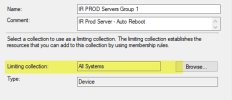
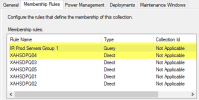
The Collection is Limited to a Collection called All Server System - in which the missing devices are showing in that collection. I've tried changing to the inbuilt collection All Systems and the same issue. First I thought it was a OU issue that it could only read down a number of levels, but there are other devices in the same OU that are showing in the collection correctly. The only way I've managed to get them to show in the Collection is to Direct Add them. This has been on going for months. Any suggestion or recommendation on how to resolve this?
 
First off what do you mean by you change the built-in collection (All Systems)? Exactly what discovery methods have you enabled? Have you reviewed the discovery logs? Are the devices listed in the all systems collection?
Secondly, how exactly did you setup your AD group collection? e.g. show the query.
 
First off what do you mean by you change the built-in collection (All Systems)? Exactly what discovery methods have you enabled? Have you reviewed the discovery logs? Are the devices listed in the all systems collection?
Secondly, how exactly did you setup your AD group collection? e.g. show the query.
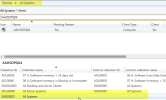
There is a default collection call All Systems, I have reviewed the discovery logs and it dose not show those devices, but picks up others in the same OU,

Discovery Methods all expect Network are enabled.

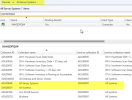
Screen shots attached
AD Query (Domain has been removed for security)

select SMS_R_SYSTEM.ResourceID,SMS_R_SYSTEM.ResourceType,SMS_R_SYSTEM.Name,SMS_R_SYSTEM.SMSUniqueIdentifier,SMS_R_SYSTEM.ResourceDomainORWorkgroup,SMS_R_SYSTEM.Client from SMS_R_System where SMS_R_System.SystemGroupName = "\\IR Prod Servers Group 1"


2023-04-12 08_23_52-Window.png2023-04-12 08_25_02-Window.png2023-04-12 08_26_01-Window.png2023-04-12 08_26_12-Window.png
 
Until those device are discovery and within the all system collection. There is no point at looking at anything else.

Force a Full System Discovery and watch the log for the device name. It will like say that there is no DNS record for the device and therefore it will NOT be discovered.
 
Until those device are discovery and within the all system collection. There is no point at looking at anything else.

Force a Full System Discovery and watch the log for the device name. It will like say that there is no DNS record for the device and therefore it will NOT be discovered.
Clearly you did not look at the screen short or read my post correctly, the devices are in the all system collections. I can search for the device host name it has the client installed on the devices and they show in the all systems collection but not in the collection that has the AD Group query.
 
Clearly you did not look at the screen short or read my post correctly, the devices are in the all system collections. I can search for the device host name it has the client installed on the devices and they show in the all systems collection but not in the collection that has the AD Group query.
Once the CM client is install, it is heartbeat discovery that will determine if a client belong to a sec group. So until the client sees that it belongs to a sec group and heartbeat dis. is run and collect is updated. They will not show up within the collection.
 
Back
Top