Forums on Intune, SCCM, and Windows 11

Welcome to the forums. Register a free account today to become a member! Once signed in, you'll be able to participate on this site by adding your topics and posts, as well as connect with other members through your own private inbox!

SOLVED Deploy windows 10 with SCCM pxe

Status
Not open for further replies.

mikrokernel

Member
Messages
19
Reaction score
2
Points
3
hi I'm trying to install windows 10 with endpoint system center in a vmware guest VM using PXE but this screen appears and then it restarts .... Does anyone know what it depends on?
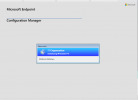
Immagine 2022-03-20 173811.png
after this screen it restarts without errors
 
Last edited:
Solution
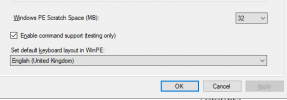
Ensure you have enabled the command support option , \Software Library\Overview\Operating Systems\Boot Images - so that you can open the command line during OS installation,

1648127652425.png

Go to this location & open the log file using CMtrace - x:\windows\temp\smstslog\smsts.log for troubleshooting.
Ensure you have enabled the command support option , \Software Library\Overview\Operating Systems\Boot Images - so that you can open the command line during OS installation,

1648127652425.png

Go to this location & open the log file using CMtrace - x:\windows\temp\smstslog\smsts.log for troubleshooting.
 
Solution
Ensure you have enabled the command support option , \Software Library\Overview\Operating Systems\Boot Images - so that you can open the command line during OS installation,

View attachment 4373

Go to this location & open the log file using CMtrace - x:\windows\temp\smstslog\smsts.log for troubleshooting.
I not have SYSTEM CENETER CONFIGURATION MANAGER 2012 but MICROSOFT ENDPOINT SYSTEM CENTER VER.2103.
I not see command support....
 
Status
Not open for further replies.

Forum statistics

Threads
7,164
Messages
27,964
Members
18,255
Latest member
Robo

Trending content

Back
Top