Forums on Intune, SCCM, and Windows 11

Welcome to the forums. Register a free account today to become a member! Once signed in, you'll be able to participate on this site by adding your topics and posts, as well as connect with other members through your own private inbox!

SOLVED SCEP Definitions not updated

CrisKolkman

Active Member
Messages
26
Solutions
2
Reaction score
0
Points
1
Hello,

I'm quite new to SCCM and we are working on deploying it in our factory.
But before deploying SCCM to 1500+ clients we use our VDI's and some test machines to test everything out.

At this point we're quite stuck at that we manage SCEP from SCCM (which is working fine) but for example my own VDI installed the definitions from 13-04-2021 and not from yesterday.
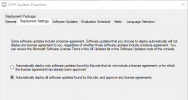
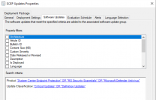
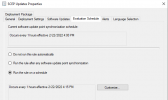
I have created an ADR with below settings:
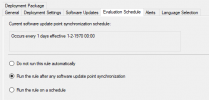
1618489767371.png

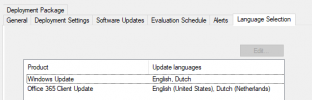
1618489795091.png

1618489823480.png
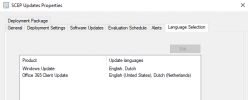
(I added Dutch just now to see if this makes a difference)
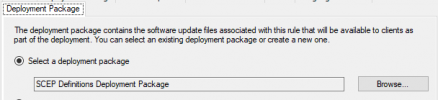
1618489872840.png

This ADR is deployed to a few device collections:
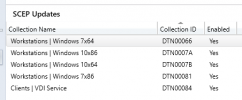
1618489965889.png

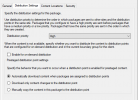
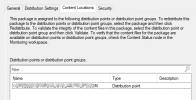
Below settings are for the Deployment Package:
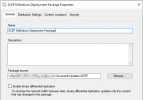
1618490047771.png

1618490071706.png

1618490109375.png

A Software Update Group named SCEP Updates has been created by above actions:

1618490432342.png

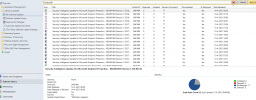
But every time I look if there are new definition updates I seem to have to add them to the Software Update Group manually (I thought ADR would do that), and as shown in the screenshot below the clients have the status Not Required:
1618490576888.png
 
Solution
Why are you using WSUS console to manage the updates ?. If the updates are showing as compliant can you check if the latest updates have been pulled directly from Internet.
Hello Prajwal,

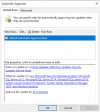
Like I said in my previous post I'm not using the WSUS console to control/manage anything, but I read somewhere that even when you use SCCM to deploy updates, you need to configure the automatic approval in WSUS (and that's all you configure in WSUS), that's the reason I did that.

It seems that most of the clients are slowly pulling the latest definition versions after I changed a few settings, so fingers crossed.
The Software Update Group shows most of the clients as Compliant, so what is the truth?
1618490736659.png

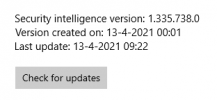
When I check my own VDI, I see below definition version:
1618490817451.png
Click Check for updates doesn't change anything.

We also want SCCM to handle the WSUS updates for the clients so I removed the WSUS GPO and I can see that the SCCM Client (?) created local policy to point to the SCCM server.
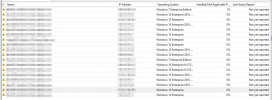
That seems to be fine but all the clients have the Not yet reported status in the WSUS console (not using the WSUS console to control anything (only automatic approval) but I was just checking).
I don't know if this is normal behavior but I'm also not sure if updates via SCCM/WSUS are working at the moment.

1618491132244.png

1618491198779.png
 
Why are you using WSUS console to manage the updates ?. If the updates are showing as compliant can you check if the latest updates have been pulled directly from Internet.
 
Why are you using WSUS console to manage the updates ?. If the updates are showing as compliant can you check if the latest updates have been pulled directly from Internet.
Hello Prajwal,

Like I said in my previous post I'm not using the WSUS console to control/manage anything, but I read somewhere that even when you use SCCM to deploy updates, you need to configure the automatic approval in WSUS (and that's all you configure in WSUS), that's the reason I did that.

It seems that most of the clients are slowly pulling the latest definition versions after I changed a few settings, so fingers crossed.
 
Solution
Hello Prajwal,

Like I said in my previous post I'm not using the WSUS console to control/manage anything, but I read somewhere that even when you use SCCM to deploy updates, you need to configure the automatic approval in WSUS (and that's all you configure in WSUS), that's the reason I did that.

It seems that most of the clients are slowly pulling the latest definition versions after I changed a few settings, so fingers crossed.
Hi, I am also facing the same problem. Is it resolved?
 
Hello @Naveedkarjikar,

Which of the 2 issues do you have?
Both are solved at our environment yes.
Hi, First I would like to thank you for your response.
Recently we have installed endpoint protection point site system role on MECM to manage windows defender & system center endpoint protection client.
For windows server 2012 & 2012 R2 system center endpoint protection client is installed and we have configured ADR to distribute definition updates for windows defender & system center endpoint protection client.

ADR is deploying definition updates (Security Intelligence Updates) for windows defender without any problem but definition updates (Security Intelligence Updates) for system center endpoint protection client is not deploying using ADR.
Error.JPG

As it shown in above screenshot this update is required by 0 computers. I am not able to reach to the point why it says required by 0 computers if it is the definition update and it is required for Microsoft endpoint protection.

I hope you understand my problem incase if you have any doubts please feel free to reply.
 
Hi, First I would like to thank you for your response.
Recently we have installed endpoint protection point site system role on MECM to manage windows defender & system center endpoint protection client.
For windows server 2012 & 2012 R2 system center endpoint protection client is installed and we have configured ADR to distribute definition updates for windows defender & system center endpoint protection client.

ADR is deploying definition updates (Security Intelligence Updates) for windows defender without any problem but definition updates (Security Intelligence Updates) for system center endpoint protection client is not deploying using ADR.
View attachment 4319

As it shown in above screenshot this update is required by 0 computers. I am not able to reach to the point why it says required by 0 computers if it is the definition update and it is required for Microsoft endpoint protection.

I hope you understand my problem incase if you have any doubts please feel free to reply.
Hello @Naveedkarjikar,

Let me start by saying that I'm not an SCCM expert at all :)
I will show our implementation below, can you confirm your setup looks (a bit) like this?

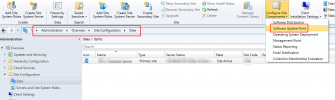
Open Software Update Point settings:
1646811642118.png

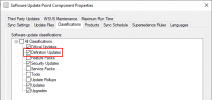
For this to work you need at least Definition Updates:
1646811736030.png

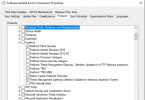
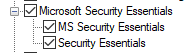
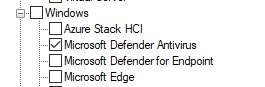
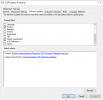
Under Products we selected:
1646811899627.png
1646811909125.png
1646811918029.png

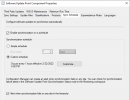
We are syncing updates every hour (note that this only syncs the updates, it doesn't download updates):

1646812659137.png
Also make sure you selected the correct languages in the Languages tab.

For the ADR:

1646813910995.png
1646813937432.png
1646813959539.png
1646813992299.png
And the deployment of the ADR is set to Required.
 
Hello @Naveedkarjikar,

Let me start by saying that I'm not an SCCM expert at all :)
I will show our implementation below, can you confirm your setup looks (a bit) like this?

Open Software Update Point settings:
View attachment 4320

For this to work you need at least Definition Updates:
View attachment 4321

Under Products we selected:
View attachment 4322
View attachment 4323
View attachment 4324

We are syncing updates every hour (note that this only syncs the updates, it doesn't download updates):

View attachment 4325
Also make sure you selected the correct languages in the Languages tab.

For the ADR:

View attachment 4326
View attachment 4327
View attachment 4328
View attachment 4329
And the deployment of the ADR is set to Required.
Hello,
Please be informed that we have exactly same configuration in place.
If you answer to my below queries may it will be helpful to resolve my problem.
1. Do you have windows server 2012 & 2012 R2 in your environment?
2. If yes System center endpoint protection is installed?
3. if installed in MECM is it showing that the definition (Security Intelligence Update) is required.
4. If yes can you please share me with KB number which says this updates is required or some screenshot with the required definition update.

Thank you
Naveed
 
1. Do you have windows server 2012 & 2012 R2 in your environment?
2. If yes System center endpoint protection is installed?
3. if installed in MECM is it showing that the definition (Security Intelligence Update) is required.
4. If yes can you please share me with KB number which says this updates is required or some screenshot with the required definition update.
1. Do you have windows server 2012 & 2012 R2 in your environment?
Yes
2. If yes System center endpoint protection is installed?
Yes
3. if installed in MECM is it showing that the definition (Security Intelligence Update) is required.
Yes
4. If yes can you please share me with KB number which says this updates is required or some screenshot with the required definition update.

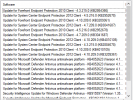
2 of our Server 2012R2 servers (but all our Server 2012R2 machines are up-to-date):
1647002889020.png

Some of the KB's deployed by our SCEP ADR:
1647003095721.png
 
Verified all settings as mentioned above but still its not working for us.
Can you please check the update source setting in antimalware policy and let us know how it is configured. also please check if UNC is also configured.
 
Verified all settings as mentioned above but still its not working for us.
Can you please check the update source setting in antimalware policy and let us know how it is configured. also please check if UNC is also configured.
Hello @Naveedkarjikar,

Also make sure there is no GPO deployed which is messing with SCCM settings.

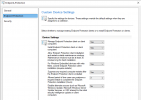
Our Client Settings:
1647329433876.png

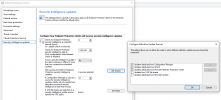
And update settings:
1647329464835.png
 

Forum statistics

Threads
7,164
Messages
27,964
Members
18,256
Latest member
anonnnn

Trending content

Back
Top