Forums on Intune, SCCM, and Windows 11

Welcome to the forums. Register a free account today to become a member! Once signed in, you'll be able to participate on this site by adding your topics and posts, as well as connect with other members through your own private inbox!

PENDING WSUS SUP Sync missing Classification & Products

Icemanmunich

Member
Messages
17
Reaction score
0
Points
1
Hello all,
I have a big problem with my SCCM/MECM for three weeks now.
The SUP finds no classifications and no products more!
I have already tried so much, but do not come to solution!?
Do you know where I can start?
SCCM/MECM is currently on 2107 & SQL2017 enterprise on a separate server 2019!
 
Hello all,
I have a big problem with my SCCM/MECM for three weeks now.
The SUP finds no classifications and no products more!
I have already tried so much, but do not come to solution!?
Do you know where I can start?
SCCM/MECM is currently on 2107 & SQL2017 enterprise on a separate server 2019!
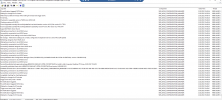
What do the logs say is the issue?
 
in the Log wsyncmgr.log

Sync failed: WSUS update source not found on site M01. Please refer to WCM.log for configuration error details.. Source: getSiteUpdateSource

STATMSG: ID=6703 SEV=E LEV=M SOURCE="SMS Server" COMP="SMS_WSUS_SYNC_MANAGER" SYS=SCCMSRV01.WCS-IT.DE SITE=M01 PID=5572 TID=9996 GMTDATE=Mi Feb 23 15:33:55.193 2022 ISTR0="getSiteUpdateSource" ISTR1="WSUS update source not found on site M01. Please refer to WCM.log for configuration error details." ISTR2="" ISTR3="" ISTR4="" ISTR5="" ISTR6="" ISTR7="" ISTR8="" ISTR9="" NUMATTRS=0 LE=0X80004005
 
I have now reinstalled I think 100 times.
1000 clean up
is always the same result?
I work for over 15 years with sccm but here I fail at the moment
 
I think I have another problem
BITS does not start anymore and brings the error -1906441690
to this error I can not find anything more specific?!
 
Can run a sync once and attach the latest wcm.log and wsyncmgr.log. Was the sync working earlier or this is the first time you have setup the WSUS along with ConfigMgr.
 
Found out today the bits service can not start and not repair!
I had once made a cleanup 3 weeks ago and since then no sync works!
 

Attachments

Sorry,
but he is newly installed and he does not sync!
He can reach MS etc!
Certificate is also in order!
Firewall is open!
I can not attach the WSYNCMGR.log because it is probably too large for the page!
 
BITS SAY %%2388525605 or Event-IT7024?! I can not found this ID???
Bits-Clients Say 0x8E5E0226 or Event-IT16392
And DCOM 10010
The server "{4991D34B-80A1-4291-83B6-3328366B9097}" could not be registered with DCOM within the specified time interval.
 

Forum statistics

Threads
7,164
Messages
27,964
Members
18,259
Latest member
willx

Trending content

Back
Top