Forums on Intune, SCCM, and Windows 11

Welcome to the forums. Register a free account today to become a member! Once signed in, you'll be able to participate on this site by adding your topics and posts, as well as connect with other members through your own private inbox!

PENDING Can't reinstall Distribution point - Failed to create virtual directory

Natália Vaz

Member
Messages
9
Reaction score
0
Points
1
I'm trying to use SCCM at work and I'm having problems with the Distribution Point.
I was able to install and test many functions, but at some point, I have to uninstall and install again Distribution Point on Site Server (I just have one Site and one DP).
When I try to reinstall DP, I get this message:

"Failed to create virtual directory on the defined share or volume on distribution point "["Display=\\peugeot.qwti.net.br\"]MSWNET:["SMS_SITE=001"]\\peugeot.qwti.net.br\".

Possible cause: Distribution Manager requires that IIS base components be installed on the local Configuration Manager Site Server in order to create the virtual directory. Distribution Manager also requires that IIS Web Services be installed on the Distribution Point Server that needs to support Background Intelligent Transfer Service (BITS).
Solution: Verify that IIS base components are installed on the local Configuration Manager Site Server, and IIS Web Services are installed on the Distribution Point Server."

The BITS are installed on server, the server is the same that i had installed DP before. I've tried reinstall IIS, SCCM, DP, and I always get the same error...

I'm using SCCM 2016 (1706), IIS 10 and Windows Server 2016

Could You help me to solve this, please? I've been trying for a long time, searched a lot and I still could not solve the problem
 
Last edited:
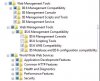
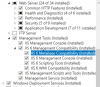
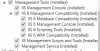
Make sure you add all of this features when you enable the IIS service
I've already check this features, and all are installed :(

I tried to install the features again, following this post, remove DP, reboot the server, install DP again. And I still have the message error about create virtual directory....

Could be a registry key that not cleaned correctly during the process of reinstall?
 

Attachments

  • iis_features.PNG
    iis_features.PNG
    19.3 KB · Views: 76
  • dism.png
    dism.png
    17.6 KB · Views: 76
  • erro_DP.PNG
    erro_DP.PNG
    115.4 KB · Views: 73
I've already check this features, and all are installed :(


I tried to install the features again, following this post, remove DP, reboot the server, install DP again. And I still have the message error about create virtual directory....

Could be a registry key that not cleaned correctly during the process of reinstall?


Hi Natalia, I am not sure if you have resolved this issue or not. Please make sure that Windows Authentication on IIS is enabled, and if you couldn't see it, make sure to enable the Windows Authentication Feature.

The other thing make sure you have used the proper SCCM account that takes care of app installation and creating directories.
 
Hi Natalia, I am not sure if you have resolved this issue or not. Please make sure that Windows Authentication on IIS is enabled, and if you couldn't see it, make sure to enable the Windows Authentication Feature.

The other thing make sure you have used the proper SCCM account that takes care of app installation and creating directories.

Hi Mahmoud87, I can't solve this yet. The Windows Authentication on IIS is already enabled... =/

I'm wondering if the problem is not related to the permissions on the drive where SCCM will create the directories ....
Can you tell me which user, what permissions, and in what directories should they be applied so that IIS can create the virtual directory?
 
Hi Mahmoud87, I can't solve this yet. The Windows Authentication on IIS is already enabled... =/

I'm wondering if the problem is not related to the permissions on the drive where SCCM will create the directories ....
Can you tell me which user, what permissions, and in what directories should they be applied so that IIS can create the virtual directory?


When you go Administration >> Site Configuration >> Servers and Site System Roles.
Then you select the DP you are having issues with at the bottom pane you'll see the role name click on the "Site System" Role name and hit properties.

upload_2017-10-24_10-25-57.png

You'll have to specify domain\user that you use for application deployment for SCCM. This account is also the one the create the directories. There is no need to specify anything in the IIS once you enabled the correct features everything is set automatically.

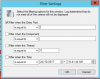
Once you check the this user, go to your SCCM server and filter the distmrg.log with the DP you're troubleshooting
upload_2017-10-24_10-42-40.png

and post it here please. Good luck.
 
When you go Administration >> Site Configuration >> Servers and Site System Roles.
Then you select the DP you are having issues with at the bottom pane you'll see the role name click on the "Site System" Role name and hit properties.

View attachment 1030

You'll have to specify domain\user that you use for application deployment for SCCM. This account is also the one the create the directories. There is no need to specify anything in the IIS once you enabled the correct features everything is set automatically.

Once you check the this user, go to your SCCM server and filter the distmrg.log with the DP you're troubleshooting
View attachment 1031

and post it here please. Good luck.


I changed the user from to test the reinstallation of DP and still continue with the error :( (ldistmgr.log attached)

Is it possible to build DP applications manually in IIS? I tried this and got the error:
create_app.PNG


If it is possible, could you send me the correct application and pool settings so I can try?
 

Attachments

I changed the user from to test the reinstallation of DP and still continue with the error :( (ldistmgr.log attached)

Is it possible to build DP applications manually in IIS? I tried this and got the error:
View attachment 1033


If it is possible, could you send me the correct application and pool settings so I can try?


I don't think you can create the directories via IIS, personally never done this and I doubt if it would be possible. Is the user you are using is member of the local administrators group on the local DP.

What is the name of the DP you're trying to troubleshoot the log file is massive, please let me know the name so I can filter it.


EDIT 1: I think I found the DP name, but I can't find the original error you used to get " Failed to create the Virtual directory"


EDIT 2: I could only see this error now
PHP:
Cannot set the current Drizzle Role status for the DP.    SMS_DISTRIBUTION_MANAGER    24/10/2017 9:06:27 AM    14280 (0x37C8)
Error occurred. Performing error cleanup prior to returning.    SMS_DISTRIBUTION_MANAGER    24/10/2017 9:06:27 AM    14280 (0x37C8)
Currently using 1 out of 3 allowed package processing threads.    SMS_DISTRIBUTION_MANAGER    24/10/2017 9:06:30 AM    8752 (0x2230)
Sleep 1819 seconds...    SMS_DISTRIBUTION_MANAGER    24/10/2017 9:06:30 AM    8752 (0x2230)
DP thread for package 00100008 with thread handle 000000000000223C and thread ID 14280 ended.    SMS_DISTRIBUTION_MANAGER    24/10/2017 9:06:30 AM    16820 (0x41B4)
DP thread with ID 14280 failed to process DP action    SMS_DISTRIBUTION_MANAGER    24/10/2017 9:06:30 AM    16820 (0x41B4)

"Cannot set the current Drizzle Role status for the DP" is usually caused by missing BITS on IIS or missing IIS 6 metabase and WMI compatibilty

Make Sure BITS and WAS services are running, try this WMI Diagnosis utility to repair problems with WMI.

https://www.microsoft.com/en-us/dow...684&751be11f-ede8-5a0c-058c-2ee190a24fa6=True
 
Last edited:
I don't think you can create the directories via IIS, personally never done this and I doubt if it would be possible. Is the user you are using is member of the local administrators group on the local DP.

What is the name of the DP you're trying to troubleshoot the log file is massive, please let me know the name so I can filter it.


EDIT 1: I think I found the DP name, but I can't find the original error you used to get " Failed to create the Virtual directory"


EDIT 2: I could only see this error now
PHP:
Cannot set the current Drizzle Role status for the DP.    SMS_DISTRIBUTION_MANAGER    24/10/2017 9:06:27 AM    14280 (0x37C8)
Error occurred. Performing error cleanup prior to returning.    SMS_DISTRIBUTION_MANAGER    24/10/2017 9:06:27 AM    14280 (0x37C8)
Currently using 1 out of 3 allowed package processing threads.    SMS_DISTRIBUTION_MANAGER    24/10/2017 9:06:30 AM    8752 (0x2230)
Sleep 1819 seconds...    SMS_DISTRIBUTION_MANAGER    24/10/2017 9:06:30 AM    8752 (0x2230)
DP thread for package 00100008 with thread handle 000000000000223C and thread ID 14280 ended.    SMS_DISTRIBUTION_MANAGER    24/10/2017 9:06:30 AM    16820 (0x41B4)
DP thread with ID 14280 failed to process DP action    SMS_DISTRIBUTION_MANAGER    24/10/2017 9:06:30 AM    16820 (0x41B4)

"Cannot set the current Drizzle Role status for the DP" is usually caused by missing BITS on IIS or missing IIS 6 metabase and WMI compatibilty

Make Sure BITS and WAS services are running, try this WMI Diagnosis utility to repair problems with WMI.

https://www.microsoft.com/en-us/dow...684&751be11f-ede8-5a0c-058c-2ee190a24fa6=True

Hi, i have only one DP, because this i didn't filter the log....

I checked BITS, WAS and WMI, all of then are instaled
iis_bits.PNG iis_WMI.PNG

I ran the wmidiag on the server and found several errors in the log .... but I do not know where to start and which can affect the DP installation .... I attached the log in message, hope you can help me with this

EDIT 1: I also checked the event viewer, and saw a WMI Warning

"A provider, SMSDPProvider, has been registered in the Windows Management Instrumentation namespace root\SCCMDP to use the LocalSystem account. This account is privileged and the provider may cause a security violation if it does not correctly impersonate user requests."
 

Attachments

Last edited:
Had a look on this logs, a lot of access denied seems like you didn't run the diagnosis tool as admin. Try and run as admin to see if we can get better results.

HTML:
.3107 14:57:19 (1) !! ERROR: (CheckWMIStaticData) : 0x80041003 - (WBEM_E_ACCESS_DENIED) Current user does not have permission to perform the action.

.3111 14:57:19 (2) !! WARNING: WMI Provider is 'SMS COMPONENT MANAGEMENT PROVIDER' is NOT a trusted WMI providers.
.3511 14:58:08 (1) !! ERROR: (CheckWMIStaticData) : 0x80041003 - (WBEM_E_ACCESS_DENIED) Current user does not have permission to perform the action.
.3512 14:58:13 (1) !! ERROR: (CheckWMIStaticData) : 0x80041003 - (WBEM_E_ACCESS_DENIED) Current user does not have permission to perform the action.


53593 15:10:32 (1) !! ERROR: (CheckWMIStaticData) : 0x80041003 - (WBEM_E_ACCESS_DENIED) Current user does not have permission to perform the action.
53594 15:10:37 (1) !! ERROR: (CheckWMIStaticData) : 0x80041003 - (WBEM_E_ACCESS_DENIED) Current user does not have permission to perform the action.
53601 15:10:37 (1) !! ERROR: (CheckWMIStaticData) : 0x80041003 - (WBEM_E_ACCESS_DENIED) Current user does not have permission to perform the action.
53870 15:10:38 (1) !! ERROR: (CheckWMIStaticData) : 0x80041003 - (WBEM_E_ACCESS_DENIED) Current user does not have permission to perform the action.
54204 15:11:13 (1) !! ERROR: (CheckWMIStaticData) : 0x80041003 - (WBEM_E_ACCESS_DENIED) Current user does not have permission to perform the action.
54211 15:11:13 (1) !! ERROR: (CheckWMIStaticData) : 0x80041003 - (WBEM_E_ACCESS_DENIED) Current user does not have permission to perform the action.
54527 15:11:19 (1) !! ERROR: (CheckWMIStaticData) : 0x80041003 - (WBEM_E_ACCESS_DENIED) Current user does not have permission to perform the action.
54944 15:11:31 (1) !! ERROR: (CheckWMIStaticData) : 0x80041003 - (WBEM_E_ACCESS_DENIED) Current user does not have permission to perform the action.
54945 15:11:36 (1) !! ERROR: (CheckWMIStaticData) : 0x80041003 - (WBEM_E_ACCESS_DENIED) Current user does not have permission to perform the action.
54952 15:11:36 (1) !! ERROR: (CheckWMIStaticData) : 0x80041003 - (WBEM_E_ACCESS_DENIED) Current user does not have permission to perform the action.
55301 15:11:42 (1) !! ERROR: (CheckWMIStaticData) : 0x80041003 - (WBEM_E_ACCESS_DENIED) Current user does not have permission to perform the action.
57089 15:12:18 (1) !! ERROR: (CheckWMIFeatures) : 0x80041003 - (WBEM_E_ACCESS_DENIED) Current user does not have permission to perform the action.
57671 15:12:23 (1) !! ERROR: (CheckWMIFeatures) : 0x80041003 - (WBEM_E_ACCESS_DENIED) Current user does not have permission to perform the action.
57673 15:12:28 (1) !! ERROR: (CheckWMIFeatures) : 0x80041003 - (WBEM_E_ACCESS_DENIED) Current user does not have permission to perform the action.
58464 15:12:34 (1) !! ERROR: (CheckWMIFeatures) : 0x80041003 - (WBEM_E_ACCESS_DENIED) Current user does not have permission to perform the action.
58466 15:12:39 (1) !! ERROR: (CheckWMIFeatures) : 0x80041003 - (WBEM_E_ACCESS_DENIED) Current user does not have permission to perform the action.
58480 15:12:44 (1) !! ERROR: (CheckWMIFeatures) : 0x80041003 - (WBEM_E_ACCESS_DENIED) Current user does not have permission to perform the action.
58482 15:12:49 (1) !! ERROR: (CheckWMIFeatures) : 0x80041003 - (WBEM_E_ACCESS_DENIED) Current user does not have permission to perform the action.
58484 15:12:54 (1) !! ERROR: (CheckWMIFeatures) : 0x80041003 - (WBEM_E_ACCESS_DENIED) Current user does not have permission to perform the action.
58486 15:12:59 (1) !! ERROR: (CheckWMIFeatures) : 0x80041003 - (WBEM_E_ACCESS_DENIED) Current user does not have permission to perform the action.
58488 15:13:04 (1) !! ERROR: (CheckWMIFeatures) : 0x80041003 - (WBEM_E_ACCESS_DENIED) Current user does not have permission to perform the action.
58490 15:13:09 (1) !! ERROR: (CheckWMIFeatures) : 0x80041003 - (WBEM_E_ACCESS_DENIED) Current user does not have permission to perform the action.
58492 15:13:14 (1) !! ERROR: (CheckWMIFeatures) : 0x80041003 - (WBEM_E_ACCESS_DENIED) Current user does not have permission to perform the action.
58494 15:13:19 (1) !! ERROR: (CheckWMIFeatures) : 0x80041003 - (WBEM_E_ACCESS_DENIED) Current user does not have permission to perform the action.
58496 15:13:24 (1) !! ERROR: (CheckWMIFeatures) : 0x80041003 - (WBEM_E_ACCESS_DENIED) Current user does not have permission to perform the action.
58498 15:13:29 (1) !! ERROR: (CheckWMIFeatures) : 0x80041003 - (WBEM_E_ACCESS_DENIED) Current user does not have permission to perform the action.
58500 15:13:34 (1) !! ERROR: (CheckWMIFeatures) : 0x80041003 - (WBEM_E_ACCESS_DENIED) Current user does not have permission to perform the action.
58502 15:13:39 (1) !! ERROR: (CheckWMIFeatures) : 0x80041003 - (WBEM_E_ACCESS_DENIED) Current user does not have permission to perform the action.
58504 15:13:44 (1) !! ERROR: (CheckWMIFeatures) : 0x80041003 - (WBEM_E_ACCESS_DENIED) Current user does not have permission to perform the action.
59156 15:13:52 (1) !! ERROR: (CheckWMIFeatures) : 0x80041003 - (WBEM_E_ACCESS_DENIED) Current user does not have permission to perform the action.
59158 15:13:57 (1) !! ERROR: (CheckWMIFeatures) : 0x80041003 - (WBEM_E_ACCESS_DENIED) Current user does not have permission to perform the action.
59160 15:14:02 (1) !! ERROR: (CheckWMIFeatures) : 0x80041003 - (WBEM_E_ACCESS_DENIED) Current user does not have permission to perform the action.
59162 15:14:07 (1) !! ERROR: (CheckWMIFeatures) : 0x80041003 - (WBEM_E_ACCESS_DENIED) Current user does not have permission to perform the action.
59164 15:14:12 (1) !! ERROR: (CheckWMIFeatures) : 0x80041003 - (WBEM_E_ACCESS_DENIED) Current user does not have permission to perform the action.
59166 15:14:17 (1) !! ERROR: (CheckWMIFeatures) : 0x80041003 - (WBEM_E_ACCESS_DENIED) Current user does not have permission to perform the action.
59168 15:14:22 (1) !! ERROR: (CheckWMIFeatures) : 0x80041003 - (WBEM_E_ACCESS_DENIED) Current user does not have permission to perform the action.
59170 15:14:27 (1) !! ERROR: (CheckWMIFeatures) : 0x80041003 - (WBEM_E_ACCESS_DENIED) Current user does not have permission to perform the action.
62076 15:16:05 (0) ** - ROOT/SCCMDP, 0x80041003 - (WBEM_E_ACCESS_DENIED) Current user does not have permission to perform the action.
62077 15:16:05 (0) ** - ROOT/CIMV2/MDM/DMMAP, 0x80041003 - (WBEM_E_ACCESS_DENIED) Current user does not have permission to perform the action.
62078 15:16:05 (0) ** - ROOT/CIMV2/SECURITY/MICROSOFTTPM, 0x80041003 - (WBEM_E_ACCESS_DENIED) Current user does not have permission to perform the action.
62079 15:16:05 (0) ** - ROOT/SECURITY, 0x80041003 - (WBEM_E_ACCESS_DENIED) Current user does not have permission to perform the action.
62080 15:16:05 (0) ** - ROOT/CCMVDI, 0x80041003 - (WBEM_E_ACCESS_DENIED) Current user does not have permission to perform the action.
62081 15:16:05 (0) ** - ROOT/RSOP/USER, 0x80041003 - (WBEM_E_ACCESS_DENIED) Current user does not have permission to perform the action.
62082 15:16:05 (0) ** - ROOT/RSOP/COMPUTER, 0x80041003 - (WBEM_E_ACCESS_DENIED) Current user does not have permission to perform the action.
62083 15:16:05 (0) ** - ROOT/PEH, 0x80041003 - (WBEM_E_ACCESS_DENIED) Current user does not have permission to perform the action.
62084 15:16:05 (0) ** - ROOT/ACCESSLOGGING, 0x80041003 - (WBEM_E_ACCESS_DENIED) Current user does not have permission to perform the action.
62085 15:16:05 (0) ** - ROOT/INVENTORYLOGGING, 0x80041003 - (WBEM_E_ACCESS_DENIED) Current user does not have permission to perform the action.
62086 15:16:05 (0) ** - ROOT/SERVICEMODEL, 0x80041003 - (WBEM_E_ACCESS_DENIED) Current user does not have permission to perform the action.
62089 15:16:05 (0) ** - ROOT/SCCMDP, 0x80041003 - (WBEM_E_ACCESS_DENIED) Current user does not have permission to perform the action.
62090 15:16:05 (0) ** - ROOT/CIMV2/MDM/DMMAP, 0x80041003 - (WBEM_E_ACCESS_DENIED) Current user does not have permission to perform the action.
62091 15:16:05 (0) ** - ROOT/CIMV2/SECURITY/MICROSOFTTPM, 0x80041003 - (WBEM_E_ACCESS_DENIED) Current user does not have permission to perform the action.
62097 15:16:05 (0) ** - ROOT/ACCESSLOGGING, 0x80041003 - (WBEM_E_ACCESS_DENIED) Current user does not have permission to perform the action.
62098 15:16:05 (0) ** - ROOT/INVENTORYLOGGING, 0x80041003 - (WBEM_E_ACCESS_DENIED) Current user does not have permission to perform the action.
62099 15:16:05 (0) ** - ROOT/SERVICEMODEL, 0x80041003 - (WBEM_E_ACCESS_DENIED) Current user does not have permission to perform the action.
62100 15:16:05 (0) ** - Root/SECURITY, 0x80041003 - (WBEM_E_ACCESS_DENIED) Current user does not have permission to perform the action.
62101 15:16:05 (0) ** - Root/RSOP/User, 0x80041003 - (WBEM_E_ACCESS_DENIED) Current user does not have permission to perform the action.
62102 15:16:05 (0) ** - Root/RSOP/Computer, 0x80041003 - (WBEM_E_ACCESS_DENIED) Current user does not have permission to perform the action.
62103 15:16:05 (0) ** - root/ccm/Messaging, 0x80041003 - (WBEM_E_ACCESS_DENIED) Current user does not have permission to perform the action.
62104 15:16:05 (0) ** - root/ccm/ContentTransferManager, 0x80041003 - (WBEM_E_ACCESS_DENIED) Current user does not have permission to perform the action.

also the BITS service on the DP is stopped
HTML:
61270 15:16:01 (3)    BITS                           Stopped     Auto Transfers files in the background using idle network bandwidth. If the service i>...

Please can you double check that the account account you have used is in the local administrators group on the Distribution Point computer. It must be the same user account you have used in here as well during the system site configuration.

upload_2017-10-26_11-26-15.png
 
Had a look on this logs, a lot of access denied seems like you didn't run the diagnosis tool as admin. Try and run as admin to see if we can get better results.

HTML:
.3107 14:57:19 (1) !! ERROR: (CheckWMIStaticData) : 0x80041003 - (WBEM_E_ACCESS_DENIED) Current user does not have permission to perform the action.

.3111 14:57:19 (2) !! WARNING: WMI Provider is 'SMS COMPONENT MANAGEMENT PROVIDER' is NOT a trusted WMI providers.
.3511 14:58:08 (1) !! ERROR: (CheckWMIStaticData) : 0x80041003 - (WBEM_E_ACCESS_DENIED) Current user does not have permission to perform the action.
.3512 14:58:13 (1) !! ERROR: (CheckWMIStaticData) : 0x80041003 - (WBEM_E_ACCESS_DENIED) Current user does not have permission to perform the action.


also the BITS service on the DP is stopped
[HTML]61270 15:16:01 (3)    BITS                           Stopped     Auto Transfers files in the background using idle network bandwidth. If the service i>...

Please can you double check that the account account you have used is in the local administrators group on the Distribution Point computer. It must be the same user account you have used in here as well during the system site configuration.

View attachment 1039

I had seen these errors, but the user with whom I was running the installation is domain administrator ....

As a matter of fact, I installed the DP again and performed the following steps:
- I added the user (domain administrator) the group of local administrators of the DP computer;
- I checked the status of the BITS service, although configured to start automatically, it was stopped. I started it.
- I asked to reinstall the DP again ....
- Checking the status of the distribution point, I encountered the same directory creation error. I went back to the services and BITS was stopped, again !!!

- I uninstalled BITS through the server manager and reinstalled again, thinking that reinstallation could correct something ....

- I tried again the DP installation .... same thing = /

- I started the service (again) and ran WMI Diag, with the same user configured to install the services. The errors of "WBEM_E_ACCESS_DENIED" no longer appear, but the BITS service continues as stopped...


EDIT: I checked the event viewer and can't see any error related with BITS or WMI :(
 

Attachments

Last edited:
I'm experiencing the exact same problem with 1706.

Hi Joshua.
Did you solve the problem?

When I had the problem the first time it was in version 1706, I uninstalled the SCCM and reinstalled the 1702 version .... but the problem appeared in it too, I did the update hoping to solve it, but still with error .... :(
 
Hi Joshua.
Did you solve the problem?

When I had the problem the first time it was in version 1706, I uninstalled the SCCM and reinstalled the 1702 version .... but the problem appeared in it too, I did the update hoping to solve it, but still with error .... :(

Unfortunately, no I haven't. It seems like a bug because I have several other roles installed on this DP and was able to uninstall and reinstall them without a problem. Also, I'm able to install the DP role on other servers.

I don't have any more time to deal with this, so I'm going to reinstall the OS on the server. I haven't had any problems installing new DPs, just the uninstall/reinstall combo. After I meet my deadlines I will try to reproduce the problem and get Microsoft involved, and I will keep you posted if the OS reinstall doesn't work for some reason.
 
Unfortunately, no I haven't. It seems like a bug because I have several other roles installed on this DP and was able to uninstall and reinstall them without a problem. Also, I'm able to install the DP role on other servers.

I don't have any more time to deal with this, so I'm going to reinstall the OS on the server. I haven't had any problems installing new DPs, just the uninstall/reinstall combo. After I meet my deadlines I will try to reproduce the problem and get Microsoft involved, and I will keep you posted if the OS reinstall doesn't work for some reason.

Unfortunately I can not reinstall the OS, I will try to reinstall SCCM again and hope it works = /
 
Just checking back in to say a reinstall of the OS worked. I removed all roles from my DP, refreshed the OS, then added all roles (DP, MP, Application Catalog Website, and Enrollment Point) back to the server. To me this indicates an issue on the DP, not the Primary Site Server or DB.

Again, once I meet some deadlines - I will try to reproduce the problem. Hopefully it's fixed in the next version. If not, I'll open a case with Microsoft.
 
Just checking back in to say a reinstall of the OS worked. I removed all roles from my DP, refreshed the OS, then added all roles (DP, MP, Application Catalog Website, and Enrollment Point) back to the server. To me this indicates an issue on the DP, not the Primary Site Server or DB.

Again, once I meet some deadlines - I will try to reproduce the problem. Hopefully it's fixed in the next version. If not, I'll open a case with Microsoft.

Just to clarify, you have reinstalled the OS on the host or just the SCCM?
 
I'm experiencing the exact same problem with System Center Configuration Manager Version 1902 with Site Version 5.0.8790.1000.
I use OS - Windows Server 2019.
Any help ? :(:confused:
 

Forum statistics

Threads
7,171
Messages
27,989
Members
18,296
Latest member
kigraa

Trending content

Back
Top