Forums on Intune, SCCM, and Windows 11

Welcome to the forums. Register a free account today to become a member! Once signed in, you'll be able to participate on this site by adding your topics and posts, as well as connect with other members through your own private inbox!

SOLVED Unable to Create Software Update Group in SCCM Server

thulasi_ram4

Member
Messages
21
Reaction score
0
Points
1
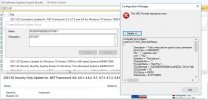
I have moved the SQL DB from my Current SCCM (SQL in same ) Server to new SQL Server. Database has been moved and reconfigured the Site Configuration for SQL Connectivity. But after Moving SQL DB I a m unable to create Software Update Group in SCCM Console. Before moving SCCM DB i am able to create the Software Update Group. I am getting below error. Please help me in fixing the issue as soon as possible.
 

Attachments

  • SCCM Server.jpg
    SCCM Server.jpg
    92.2 KB · Views: 17
That error has nothing to do with the console. it is a third party tool. You should contact the author for help.
 
Solution
Did you read the SQL message. I can't see it all but it is likely telling you what the issue it. Also Keep in mind that MIGHT be related to your WSUS db.
 
below Issue Occuring


ConfigMgr Error Object:
instance of SMS_ExtendedStatus
{
Description = "Fail to execute the query to sync permission : exec spRBAC_SyncPermissions.";
ErrorCode = 2169048832;
File = "..\\ssprbac.cpp";
Line = 7182;
Operation = "PutInstance";
ParameterInfo = "";
ProviderName = "ExtnProv";
SQLMessage = "[42000][50000][Microsoft][SQL Server Native Client 11.0][SQL Server]Get Error Error Number 468 Severity 16 State 9 Procedure spRBAC_SyncPermissions_Objects Line 88 Message Cannot resolve the collation conflict between \"Latin1_General_CI_AI\" and \"SQL_Latin1_General_CP1_CI_AS\" in the equal to operation.. : spRBAC_SyncPermissions";
SQLSeverity = 16;
SQLStatus = 50000;
StatusCode = 2147749889;
};

-------------------------------
Microsoft.ConfigurationManagement.ManagementProvider.WqlQueryEngine.WqlQueryException
The SMS Provider reported an error.


Stack Trace:
at Microsoft.ConfigurationManagement.ManagementProvider.WqlQueryEngine.WqlResultObject.Put(ReportProgress progressReport)
at Microsoft.ConfigurationManagement.ManagementProvider.WqlQueryEngine.WqlResultObject.Put()
at Microsoft.ConfigurationManagement.AdminConsole.AuthorizedUpdates.CreateUpdateGroup.saveWorker_DoWork(Object sender, DoWorkEventArgs e)
at System.ComponentModel.BackgroundWorker.OnDoWork(DoWorkEventArgs e)
at System.ComponentModel.BackgroundWorker.WorkerThreadStart(Object argument)

-------------------------------

System.Management.ManagementException
Generic failure


Stack Trace:
at Microsoft.ConfigurationManagement.ManagementProvider.WqlQueryEngine.WqlResultObject.Put(ReportProgress progressReport)
at Microsoft.ConfigurationManagement.ManagementProvider.WqlQueryEngine.WqlResultObject.Put()
at Microsoft.ConfigurationManagement.AdminConsole.AuthorizedUpdates.CreateUpdateGroup.saveWorker_DoWork(Object sender, DoWorkEventArgs e)
at System.ComponentModel.BackgroundWorker.OnDoWork(DoWorkEventArgs e)
at System.ComponentModel.BackgroundWorker.WorkerThreadStart(Object argument)

-------------------------------
 
There you go the error is telling you exact what the problem is. Your SQL server is setup with a different collation. Is this SQL server only used for CM/WSUS? What collation is the SQL server itself? aka temp db for example.
 
Currently i have moved the SCCM DB from old server to new SQL Server. Still my WSUS DB in old server. I need your assistance in resolving the issue. I am facing first time this type of issue.
 
Why did you move the site server db and not WSUS? Did you check the collation of you new SQL server?
 
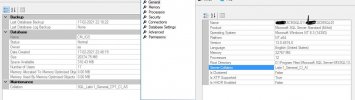
I have lake of hardware issue for the VM in current hypervisor. the sccm sever is consuming 95% of RAM and 80% CPU. its showing perform wise on sccm server. Hence we have been moe the DB from sccm server to standalone sql server. we need to move the wsus as well. but we are struck up with patch deployment for the organization. post deployment i am planning. Collation is different new sql server for Server instance and DB Instance. How to change this. Please Suggest accordingly.SCCM2.JPG
 
As far as I know the only way to change the collation is to reinstall SQL.
 

Forum statistics

Threads
7,198
Messages
28,090
Members
18,366
Latest member
dharibe
Back
Top