Forums on Intune, SCCM, and Windows 11

Welcome to the forums. Register a free account today to become a member! Once signed in, you'll be able to participate on this site by adding your topics and posts, as well as connect with other members through your own private inbox!

SOLVED SUP option missing SCCM menu

  • Thread starter Thread starter inshaf
  • Start date Start date
  • Replies Replies 4
  • Views Views 2K
Status
Not open for further replies.

inshaf

New Member
Messages
4
Reaction score
0
Points
1
i did fresh install of SCCM 2403 post installation and roles configured i figured out the SUP Properties missing classic menu as shown below it doesn't show all items alike sync setting and everything. Can someone help to figure out this and removed and added roles few times still its the same . WSUS and database installed on same server
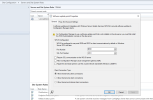
1732520025905.png
 
Solution
Yes I followed the guidelines as mentioned
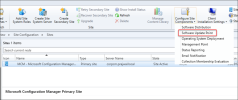
You are viewing the details in the incorrect way. The correct way to see the SUP properties is by going to Administration\Overview\Site Configuration\Sites. Select the site and in the top ribbon, click configure site components > software update point.

1732632257396.png
Yes I followed the guidelines as mentioned
You are viewing the details in the incorrect way. The correct way to see the SUP properties is by going to Administration\Overview\Site Configuration\Sites. Select the site and in the top ribbon, click configure site components > software update point.

1732632257396.png
 
Solution
Status
Not open for further replies.

Forum statistics

Threads
7,196
Messages
28,081
Members
18,354
Latest member
davidluong
Back
Top