Forums on Intune, SCCM, and Windows 11

Welcome to the forums. Register a free account today to become a member! Once signed in, you'll be able to participate on this site by adding your topics and posts, as well as connect with other members through your own private inbox!

PENDING Query for KB890830

dbnaglad

New Member
Messages
4
Reaction score
0
Points
1
Hello All, Happy New Year!
I need some help to create a SQL query for system that has this KB890830 which is Microsoft Malicious Removal Tool. It is only showing in the Other Updates in Update History for windows 11 systems. I can search the system and it is a .exe file which is mrt.ext in system32 folder but If I map the system using UNC path it does not result anything. .exe file is enabled in sccm so that I can search in the database but I do not see mrt.exe even the system showing it is there in other updates in update history. This is driving me nuts, wish someone can please help me if possible. thanks in advance.
 
Hello All, Happy New Year!
I need some help to create a SQL query for system that has this KB890830 which is Microsoft Malicious Removal Tool. It is only showing in the Other Updates in Update History for windows 11 systems. I can search the system and it is a .exe file which is mrt.ext in system32 folder but If I map the system using UNC path it does not result anything. .exe file is enabled in sccm so that I can search in the database but I do not see mrt.exe even the system showing it is there in other updates in update history. This is driving me nuts, wish someone can please help me if possible. thanks in advance.
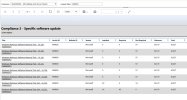
what is wrong with the built in software update reports for this?
 
I just tested this and it works for me.

View attachment 6879

I just tested this and it works for me.

View attachment 6879
I used the same report and do not see any result. I believe if you deployed that tool then only u can see the result. In our case, we did not deploy this tool, but we r seeing some systems that were updated from windows 10 to Windows 11, have that tool installed and only showing under other update history, on those system.
 
I used the same report and do not see any result. I believe if you deployed that tool then only u can see the result. In our case, we did not deploy this tool, but we r seeing some systems that were updated from windows 10 to Windows 11, have that tool installed and only showing under other update history, on those system.
What exactly is your end goal? why are you not deploying it with ConfigMgr?
 
What exactly is your end goal? why are you not deploying it with ConfigMgr?
Thanks for u r reply. We r trying to create a report or query to check how many system have tht tool installed. Whn we can find that we will uninstall that if we can. But for now we need to find how many systems it has installed. But problem is that as I mentioned we did not install it. We t only noticing on the systems that r upgraded from win 10 to win 11. Hope I was able to explain.
 
Thanks for u r reply. We r trying to create a report or query to check how many system have tht tool installed. Whn we can find that we will uninstall that if we can. But for now we need to find how many systems it has installed. But problem is that as I mentioned we did not install it. We t only noticing on the systems that r upgraded from win 10 to win 11. Hope I was able to explain.
If you are not using ConfigMgr to deploy software updates then it will be very difficult to get the inventory of software updates. What system are you using to deploy software updates?
 
Back
Top