Forums on Intune, SCCM, and Windows 11

Welcome to the forums. Register a free account today to become a member! Once signed in, you'll be able to participate on this site by adding your topics and posts, as well as connect with other members through your own private inbox!

SOLVED Applications are not installed after updating to SCCM 2403

  • Thread starter Thread starter sandstein
  • Start date Start date
  • Replies Replies 3
  • Views Views 4K
Status
Not open for further replies.

sandstein

New Member
Messages
4
Solutions
1
Reaction score
0
Points
1
After the successful update to CM version 2403. incl. Hotfix KB 28458746 the applications are not installed.

It is interesting to note that all Windows updates and packages are installed. Except for the applications.

I also found that the application deployment policies are successfully installed in the WMI (class: CCM_ApplicationCIAssignment, namespace: \ROOT\ccm\Policy\Machine\ActualConfig)
The log files "AppIntentEval.log" and "AppDiscovery.log" should then be generated. However, this does not happen.

Furthermore, it may be of interest that computers that have not yet upgraded to SCCM client version 5.00.9128.1014, but have remained on the old SCCM version (version 5.00.9106.1000), the distribution of applications works.

Thank you very much for your support!
 
Solution
I don't know what the problem was, but after half a week the problem was solved by itself.
The problem no longer exists and everything works as it should.
After an upgrade, the configuration manager automatically updates client package to the latest version. In some cases, this may not happen and you will need to update the client installation package manually from \Software Library\Overview\Application Management\Packages.

Next, do you see appenforce.log created on the machines?. If it's not, you will have to review smsts.log to see what's happening at the install applications step.
 
Thank you very much for your feedback!
The parcels have been successfully distributed to the DP. This primarily concerns the "Configuration Manager Client Package".
The update can be seen on the screen.

And no, the files "AppIntentEval.log", "AppDiscovery.log", "appenforce.log" and "smsts.log" are not generated on my test client. As a reminder, this is not a task sequence because you are addressing the "smsts.log".
1722938212856.png
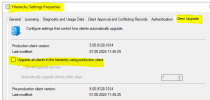
I would also like to point out that I have not yet activated the option "Upgrade all clients in the hierarchy using production client" because I want to check how it works on a test client first.
1722939440919.png
 
Last edited:
I don't know what the problem was, but after half a week the problem was solved by itself.
The problem no longer exists and everything works as it should.
 
Solution
Status
Not open for further replies.

Forum statistics

Threads
7,197
Messages
28,083
Members
18,355
Latest member
mattjimf

Latest posts

Back
Top