Forums on Intune, SCCM, and Windows 11

Welcome to the forums. Register a free account today to become a member! Once signed in, you'll be able to participate on this site by adding your topics and posts, as well as connect with other members through your own private inbox!

PENDING Windows Updates Not Deploying on All Systems

  • Thread starter Thread starter clush
  • Start date Start date
  • Replies Replies 3
  • Views Views 1K

clush

Member
Messages
23
Reaction score
0
Points
1
Hello,

We have ADR's with some of the systems within the environment not getting the updates. We are running Windows 10 22H2 on our clients. Please see the screenshot of the error codes. Some are self explanatory such as there is not enough disk space but there are some I am not sure where to look. If you can suggest the log files server side and client side i should take a look at that would be great. Or if you have seen this before any suggestions i could take in trying to resolve this issue.
For the most part the majority of the clients are receiving the updates

Thank you for you help...

Craig
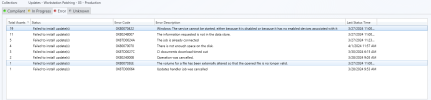
update_errors.png
 
Have you looked at your boundaries and boundary groups to ensure that the deployments are applicable\availble with the boundary these clients are in? Do the systems show the updates in Software Center (only applicable if the deployment is set accordingly for the user experience?) Client side logs I would check are UpdatesDeployment.log, UpdatesHandler.log, UpdatesStore.log, and WUAHandler.log. I would not worry to much about server side logs as the issue you are describing seems to be client specific.
 
Have you looked at your boundaries and boundary groups to ensure that the deployments are applicable\availble with the boundary these clients are in? Do the systems show the updates in Software Center (only applicable if the deployment is set accordingly for the user experience?) Client side logs I would check are UpdatesDeployment.log, UpdatesHandler.log, UpdatesStore.log, and WUAHandler.log. I would not worry to much about server side logs as the issue you are describing seems to be client specific.
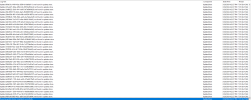
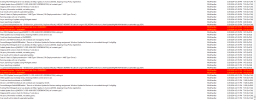
Thank you for the information. I did check all those logs. Please see screenshots of the log files. This system is in a lab of 25 machines and is the only one that not getting its updates. I will check the boundaries but i would think that the rest of the machines in that lab would have the same issue.

I did check the software center and there are no updates available for this particular system.

UpdateHandler.log no errors all successful...
Please see the other 3 log files in screenshot.

I am thinking i may remove the client from the machine and try reinstalling it. In the WUAHandler it states that the machine is not enrolled in MDM for some reason. You will see in the screenshot.

Thanks for your help...

Craig
 

Attachments

  • UpdatesDeployment.png
    UpdatesDeployment.png
    51.9 KB · Views: 2
  • UpdatesStore.png
    UpdatesStore.png
    102.2 KB · Views: 2
  • WUAHandler.png
    WUAHandler.png
    107.1 KB · Views: 2
Back
Top