Forums on Intune, SCCM, and Windows 11

Welcome to the forums. Register a free account today to become a member! Once signed in, you'll be able to participate on this site by adding your topics and posts, as well as connect with other members through your own private inbox!

PENDING why "schedule updates" added to an operating system image is APPLICABLE instead of INSTALLED

  • Thread starter Thread starter micdam
  • Start date Start date
  • Replies Replies 5
  • Views Views 4K

micdam

Well-Known Member
Messages
99
Reaction score
1
Points
8
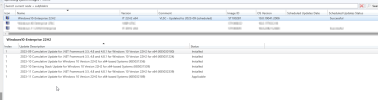
I have been using the 'schedule updates' feature to add monthly updates to operating system images, and for the past few months, the update status has been 'applicable' instead of 'installed' for Cumulative Updates for the Windows version. However, for Cumulative Updates for .NET Framework, it shows as 'installed.' If I use the DISM procedure, the update will be installed."
1702566484070.png
1702566516322.png
if i used dism procedure the update will be installed
 
I am unable to replicate this issue in my lab. Try upgrading to the latest CB version and let us know if you see any success.
 
I have been using the 'schedule updates' feature to add monthly updates to operating system images, and for the past few months, the update status has been 'applicable' instead of 'installed' for Cumulative Updates for the Windows version. However, for Cumulative Updates for .NET Framework, it shows as 'installed.' If I use the DISM procedure, the update will be installed."
View attachment 5778
View attachment 5779
if i used dism procedure the update will be installed
I have the same problem. Have you solved this issue?
 
Back
Top