
The Microsoft Intune service update for February 2026 includes a host of exciting updates and enhancements including EPM support for Azure Virtual Desktop (AVD), a direct link to Lenovo Device Orchestration, numerous updates to the Android and Apple settings catalog, new admin tasks in the Intune admin center, and much more.
The Intune updates for February 2026 should be automatically rolled out to all the tenants across major regions such as APAC, NASA, and EMEA. In the Intune admin center, go to Tenant Administration and select the Tenant Status tab to see the current service release of your tenant. For more information on previously released updates, read the article on Intune monthly updates.
The Intune release for February 2026 includes the following new features and enhancements.
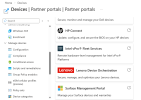
To access the Lenovo Device Orchestration, in the Intune admin center, go to Devices > Partner Portals and select Lenovo Device Orchestration.
The Intune updates for February 2026 should be automatically rolled out to all the tenants across major regions such as APAC, NASA, and EMEA. In the Intune admin center, go to Tenant Administration and select the Tenant Status tab to see the current service release of your tenant. For more information on previously released updates, read the article on Intune monthly updates.
For more details, refer to Microsoft documentation on New Features and changes in Intune February 2026 Update.
The Intune release for February 2026 includes the following new features and enhancements.
1. Endpoint Privilege Management support on Azure Virtual Desktop
This was the most awaited feature and is finally available at the beginning of year 2026. Endpoint Privilege Management (EPM) elevation policies now support deployment to users on Azure Virtual Desktop (AVD) single-session virtual machines.2. Lenovo Device Orchestration (LDO) link in the Intune admin center
Microsoft Intune now features a seamless integration with Lenovo Device Orchestration (LDO), accessible directly from the Intune admin center. This enhancement enriches the Partner Portals experience by providing IT administrators with a centralized, secure platform to manage supported Lenovo devices. IT admins can effortlessly access the Lenovo Device Orchestration portal to utilize Lenovo-specific device management tools and capabilities.To access the Lenovo Device Orchestration, in the Intune admin center, go to Devices > Partner Portals and select Lenovo Device Orchestration.
3. Newly available protected apps for Intune
The following protected apps are now available for Microsoft Intune:- Clarity Express for Intune by Rego Consulting Corporation
- Datadog by Datadog Inc.
- Qlik Analytics by Qlik
- Tier1 for Intune by SS&C Technologies, Inc. (iOS)
4. New supported OEMConfig apps for Android Enterprise
The following OEMConfig apps are available in Intune for Android Enterprise:- FCNT - Senior Care | com.fcnt.mobile_phone.seniorcareconfig
- FCNT - Schema | com.fcnt.mobile_phone.schematest
- Sonim | com.sonim.oemappconfig


