
Hi,
I upgraded our server from 2006 to 2010. All went well, no errors in the logs.
The server is upgraded to 2010, so is the Management console and all systems/services are running fine.
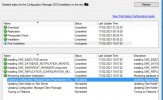
However the last 4 steps in POST install will not start.
[Not started]:Updating StagingClient folder used by Configuration Manager Client Preproduction Package
[Not started]:Updating Client folder on the Site Server from the installed Configuration Manager Update Package
[Not started]:Updating Client folder used by Configuration Manager Client Package
[Not started]:Turning on Features. Please reopen ConfigMgr Console to see the new features
After a couple of hours waiting,
I restarted all SCCM services, rebooted the server but in the Administration Tab, Updates and servicing remains in state "installing" and under Monitoring the status is installed however when you open it it's in status run "Post installation"
Anyone ever experiences such a behavior? for me it's the first time since the beginning of SCCM. With no error in the logs (hman,log, cmupdate.log) I'm a bit lost on where to look or how to kick start the remaining 4 steps so my clients can get the latest agent build.
Maybe someone here has a sparkle idea.
Thanks for your time.
From my hman.log file - It's looping on this
-------
INFO: 196612.ESC file was found. Updating client packages. InteropMode = 0 19320 (0x4B78)
WARN: The current update package's state (196609) is not set to installed yet. Will retry in next cycle. 19320 (0x4B78)
reached handle office cab 19320 (0x4B78)
C:\Program Files\Microsoft Configuration Manager\CMUStaging\ApplicabilityChecks\CM2010_KB4594177_AppCheck.sql has hash value SHA256 E6659BFBE7C2354A88D8F7F709583BFA45724253B7708204ACF1EF0EA80F3FC 19320 (0x4B78)
SQL MESSAGE: - This is not a 2010 SR/FR3, or an earlier version without catchup installed, skip this hotfix 19320 (0x4B78)
Configuration Manager Update (PackageGuid=1A19DE07-0F36-4959-A2CF-0C957274F9D7) is not applicable and should be filtered. 19320 (0x4B78)
C:\Program Files\Microsoft Configuration Manager\CMUStaging\ApplicabilityChecks\CM2010_KB4594176_AppCheck.sql has hash value SHA256:7E16C346D5F7F91053CC926EC04542FACD12DA59018B51A08FD25603E8B7AE4E 19320 (0x4B78)
SQL MESSAGE: - This is not a 2010 Fast Ring build, skip this hotfix 19320 (0x4B78)
Configuration Manager Update (PackageGuid=FD82FF41-4F4C-4D5E-8AB8-4B750CE103B1) is not applicable and should be filtered. 19320 (0x4B78)
Successfully checking Site server readiness for update. 19320 (0x4B78)
There are update package in progress. Cleanup will skip this time. 19320 (0x4B78)
Waiting for Configuration Manager Update changes for maximum 300 seconds... 19320 (0x4B78)
I upgraded our server from 2006 to 2010. All went well, no errors in the logs.
The server is upgraded to 2010, so is the Management console and all systems/services are running fine.
However the last 4 steps in POST install will not start.
[Not started]:Updating StagingClient folder used by Configuration Manager Client Preproduction Package
[Not started]:Updating Client folder on the Site Server from the installed Configuration Manager Update Package
[Not started]:Updating Client folder used by Configuration Manager Client Package
[Not started]:Turning on Features. Please reopen ConfigMgr Console to see the new features
After a couple of hours waiting,
I restarted all SCCM services, rebooted the server but in the Administration Tab, Updates and servicing remains in state "installing" and under Monitoring the status is installed however when you open it it's in status run "Post installation"
Anyone ever experiences such a behavior? for me it's the first time since the beginning of SCCM. With no error in the logs (hman,log, cmupdate.log) I'm a bit lost on where to look or how to kick start the remaining 4 steps so my clients can get the latest agent build.
Maybe someone here has a sparkle idea.
Thanks for your time.
From my hman.log file - It's looping on this
-------
INFO: 196612.ESC file was found. Updating client packages. InteropMode = 0 19320 (0x4B78)
WARN: The current update package's state (196609) is not set to installed yet. Will retry in next cycle. 19320 (0x4B78)
reached handle office cab 19320 (0x4B78)
C:\Program Files\Microsoft Configuration Manager\CMUStaging\ApplicabilityChecks\CM2010_KB4594177_AppCheck.sql has hash value SHA256
E6659BFBE7C2354A88D8F7F709583BFA45724253B7708204ACF1EF0EA80F3FC 19320 (0x4B78)SQL MESSAGE: - This is not a 2010 SR/FR3, or an earlier version without catchup installed, skip this hotfix 19320 (0x4B78)
Configuration Manager Update (PackageGuid=1A19DE07-0F36-4959-A2CF-0C957274F9D7) is not applicable and should be filtered. 19320 (0x4B78)
C:\Program Files\Microsoft Configuration Manager\CMUStaging\ApplicabilityChecks\CM2010_KB4594176_AppCheck.sql has hash value SHA256:7E16C346D5F7F91053CC926EC04542FACD12DA59018B51A08FD25603E8B7AE4E 19320 (0x4B78)
SQL MESSAGE: - This is not a 2010 Fast Ring build, skip this hotfix 19320 (0x4B78)
Configuration Manager Update (PackageGuid=FD82FF41-4F4C-4D5E-8AB8-4B750CE103B1) is not applicable and should be filtered. 19320 (0x4B78)
Successfully checking Site server readiness for update. 19320 (0x4B78)
There are update package in progress. Cleanup will skip this time. 19320 (0x4B78)
Waiting for Configuration Manager Update changes for maximum 300 seconds... 19320 (0x4B78)
Attachments
Last edited:


