We are trying to create deployments with multiple deployment types to handle different scenarios like Deep Freeze and Microsoft's Unified Write Filter. Deep Freeze was easy, but creating a deployment type with requirements for UWF fails when UWF is NOT installed on the target.
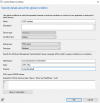
If we create a custom global condition like this:
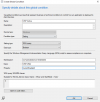
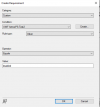
and then add the requirement that UWF is currently inactive:
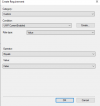
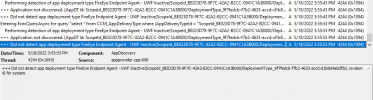
It works. However, when UWF is NOT installed DCMWmiProvider.log shows:

and the application fails install even though there is another deployment type that should run when UWF is not present. The deployment type that has highest priority looks for a registry key that is only present when UWF is installed and should run if it doesn't exist. I confirmed that by deleting the second deployment type that queries WMI for the UWF_Filter class. The application immediately installed.
If UWF is installed, the above UWF_Filter query works and the application installs without error when UWF CurrentEnabled is false. It is only when UWF is not installed that the whole thing fails. I have tried adding the reqistry key exists requirement to the UWF Active deployment type without success and I tried adding a requirement that the CurrentEnabled property exists, but both attempts failed. We get the same invalid class error in the DCMWmiProvider.log.
Anyone have an idea how we can get this working when UWF is not installed?
If we create a custom global condition like this:
and then add the requirement that UWF is currently inactive:
It works. However, when UWF is NOT installed DCMWmiProvider.log shows:
and the application fails install even though there is another deployment type that should run when UWF is not present. The deployment type that has highest priority looks for a registry key that is only present when UWF is installed and should run if it doesn't exist. I confirmed that by deleting the second deployment type that queries WMI for the UWF_Filter class. The application immediately installed.
If UWF is installed, the above UWF_Filter query works and the application installs without error when UWF CurrentEnabled is false. It is only when UWF is not installed that the whole thing fails. I have tried adding the reqistry key exists requirement to the UWF Active deployment type without success and I tried adding a requirement that the CurrentEnabled property exists, but both attempts failed. We get the same invalid class error in the DCMWmiProvider.log.
Anyone have an idea how we can get this working when UWF is not installed?