Ravi Kumar
Active Member
- Messages
- 31
- Solutions
- 2
- Reaction score
- 0
- Points
- 6
Hello All,
Hope you all are doing great,
So, I created a task Sequence and deployed it to some workstations and servers, on workstations it went well. On Servers i am not able to see the Task sequence, i can see the packages and applications are available but no task sequence.
Things which i already check.
1. TS is targeted to the right collection
2. Device is part of collection
3. Memberships is correct.
4. Client Health Check
5. Reinstall SCCM Client
6. Review Windows Event Logs nothing was there.
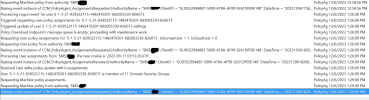
7. Review PolicyAgent.log
Just to bring under notice I have configured custom client settings which is deployed on the Workstations but there is no client policy configured for Servers.
This is really urgent and your kind attention would be highly appreciated.
Best Regards
Ravi Kumar
Hope you all are doing great,
So, I created a task Sequence and deployed it to some workstations and servers, on workstations it went well. On Servers i am not able to see the Task sequence, i can see the packages and applications are available but no task sequence.
Things which i already check.
1. TS is targeted to the right collection
2. Device is part of collection
3. Memberships is correct.
4. Client Health Check
5. Reinstall SCCM Client
6. Review Windows Event Logs nothing was there.
7. Review PolicyAgent.log
Just to bring under notice I have configured custom client settings which is deployed on the Workstations but there is no client policy configured for Servers.
This is really urgent and your kind attention would be highly appreciated.
Best Regards
Ravi Kumar