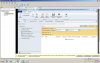
S syed sameer Well-Known Member Messages 144 Reaction score 2 Points 18 Nov 24, 2015 #1 Dear Prajwal I install and configured SCCM 2012 R2 SP1 successfully, but when I search for software updates nothing is showing kindly see the attachment and give me proper resolving methods Attachments Untitled.png 140.4 KB · Views: 3
Dear Prajwal I install and configured SCCM 2012 R2 SP1 successfully, but when I search for software updates nothing is showing kindly see the attachment and give me proper resolving methods
Prajwal Desai Forum Owner Staff member Messages 5,041 Solutions 145 Reaction score 981 Points 413 Nov 25, 2015 #2 Without adding search criteria, if you just click on All Software Updates, do you see any updates ?. Upvote 0 Downvote
OP S syed sameer Well-Known Member Messages 144 Reaction score 2 Points 18 Nov 25, 2015 Thread Starter #3 No I did not see any updates Upvote 0 Downvote
Prajwal Desai Forum Owner Staff member Messages 5,041 Solutions 145 Reaction score 981 Points 413 Nov 25, 2015 #4 Check wsyncmgr.log, WCM.log and wsyncmgr.log files. You need to check if the synchronization is happening or not. Upvote 0 Downvote
Check wsyncmgr.log, WCM.log and wsyncmgr.log files. You need to check if the synchronization is happening or not.
OP S syed sameer Well-Known Member Messages 144 Reaction score 2 Points 18 Nov 28, 2015 Thread Starter #5 Dear I cant open wcm.log and wsyncmgr.log file , how should I open ? Upvote 0 Downvote
Prajwal Desai Forum Owner Staff member Messages 5,041 Solutions 145 Reaction score 981 Points 413 Nov 29, 2015 #6 you can open the log file with configuration manager trace log tool located inside the installation media. Upvote 0 Downvote
you can open the log file with configuration manager trace log tool located inside the installation media.