Forums on Intune, SCCM, and Windows 11

Welcome to the forums. Register a free account today to become a member! Once signed in, you'll be able to participate on this site by adding your topics and posts, as well as connect with other members through your own private inbox!

PENDING Unable to download patches in SCCM console

  • Thread starter Thread starter havee
  • Start date Start date
  • Replies Replies 4
  • Views Views 7K

havee

New Member
Messages
3
Reaction score
0
Points
1
Hi All,
Im currently working on a single primary SCCM site. Whenever i try to download patches in SCCM console, im getting an error as below.
Have you encountered this issue before?
Error : Error: The .DLL containing the native code to download software updates was not found.
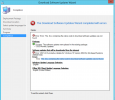
1620124073933.png
 
Check the PatchDownloader.log file. It's usually in %temp%. So the error is the .dll containing the native code to download software updates was not found. You can try running the console as administrator and confirm if you see the same issue. Are you using the console on a remote machine ?.
 
Hi Prajwal,
Patchdownloader.log is not present in my %temp% folder.
Tried running SCCM console as admin but the issue still persists. Currently im running the console directly on the primary server.
 
Hi Prajwal,

Issue is fixed after i manually copied patchdownloader.dll to C:\Program Files (x86)\Microsoft Endpoint Manager\AdminConsole\bin

Thanks for your time
 
Correction... patchdownloader.dll copied to:
C:\Program Files (x86)\Microsoft Endpoint Manager\AdminConsole\bin\i386

Can we get a slow clap for Microsoft?
 

Forum statistics

Threads
7,130
Messages
27,846
Members
18,145
Latest member
Rothgar
Back
Top