Forums on Intune, SCCM, and Windows 11

Welcome to the forums. Register a free account today to become a member! Once signed in, you'll be able to participate on this site by adding your topics and posts, as well as connect with other members through your own private inbox!

SOLVED Unable to connect to WMI on remote machine, error = 0x800706ba

Status
Not open for further replies.
Unable to connect to WMI on remote machine, error = 0x800706ba

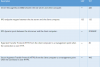
1) Ensure you have opened the below listed ports on the firewall.

upload_2016-2-8_16-58-0.png

2) Ensure File And Printer Sharing and WMI is opened on the clients Firewall to allow the client push to work correctly. Check this link - http://prajwaldesai.com/configuring-firewall-settings-for-configuration-manager-2012-r2/

3) Error 0x800706ba = The RPC server is unavailable. Can you connect to the remote machine using explorer (admin$), regedit and WMI (wbemtest)?
 
Are you using hardware firewall within LAN ?. I don't think so. Check the ports on Windows Firewall.
 
Internally we have not blocked any ports (all ports are allowed on switch level). On SCCM server Firewall is turned off.

I will try above mentioned steps for Configuring Firewall Settings and update the result.

Thanks for your support sir...
 
Hi Sir, Gd morning. Its for all machines. Finally got to know ports were blocked on Symantec anti virus, un-installed anti virus and tried client push its worked.
 
Status
Not open for further replies.

Forum statistics

Threads
7,133
Messages
27,860
Members
18,151
Latest member
TonyGTR
Back
Top