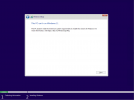
I just downloaded Windows 11 yesterday. I built a test Virtual Machine in Hyper-V, put it into "Audit Mode" and made a few customizations. I decided I wanted to capture it and test deployment using EndPoint Configuration Manager.
I downloaded the latest Windows 11 ADK and ADK WinPE Add-On, removed my previous version, rebooted, and installed both ADK and the WinPE Add-On. I rebooted again, went to my Boot images, and updated them successfully. I opened my Endpoint Configuration Manager (showing as version 2107), and navigated to Software Library > Operating Systems > Task Sequences > right-clicked and selected "Create Task Sequence Media". I selected capture media, and created the capture media ISO.
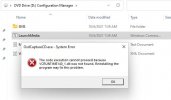
I attached that .ISO to my newly created VM opened the D: drive, and clicked "Launch Media" and immediately received the following error message: "The code execution cannot proceed because VCRUNTIME140_1.dll was not found. Reinstalling the program may fix this problem".
I thought to myself that maybe one of my customizations caused this, so I started over, and just built a fresh Windows 11 Virtual Machine and made zero changes to it. Attached the capture media.iso to it, and attempted to click "Launch Media" again, and received the same error message
A simple search on this reveals the necessity to install Visual C++ Runtime 2015, 2017, 2019, 2022 in both x86 and x64 versions, or copy VCRUNTIME140_1.dll from a working machine to C:\Windows\System32. I opted to install the Visual C++ Runtime libraries, and viola, I was able to click "Launch Media" and begin entering the settings to start my capture process (initiating a sysprep).
I have attached screenshots as well.
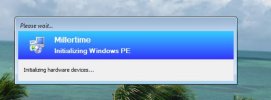
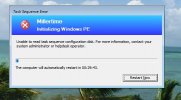
Once the sysprep completed, the machine rebooted as expected, and launched into a Windows PreBoot (PE) environment. I saw the status window for "initializing hardware devices" and after a few seconds it failed. I then receive a message saying "Unable to read task sequence configuration disk. For more information, contact your system administrator or helpdesk operator."
I downloaded the latest Windows 11 ADK and ADK WinPE Add-On, removed my previous version, rebooted, and installed both ADK and the WinPE Add-On. I rebooted again, went to my Boot images, and updated them successfully. I opened my Endpoint Configuration Manager (showing as version 2107), and navigated to Software Library > Operating Systems > Task Sequences > right-clicked and selected "Create Task Sequence Media". I selected capture media, and created the capture media ISO.
I attached that .ISO to my newly created VM opened the D: drive, and clicked "Launch Media" and immediately received the following error message: "The code execution cannot proceed because VCRUNTIME140_1.dll was not found. Reinstalling the program may fix this problem".
I thought to myself that maybe one of my customizations caused this, so I started over, and just built a fresh Windows 11 Virtual Machine and made zero changes to it. Attached the capture media.iso to it, and attempted to click "Launch Media" again, and received the same error message
A simple search on this reveals the necessity to install Visual C++ Runtime 2015, 2017, 2019, 2022 in both x86 and x64 versions, or copy VCRUNTIME140_1.dll from a working machine to C:\Windows\System32. I opted to install the Visual C++ Runtime libraries, and viola, I was able to click "Launch Media" and begin entering the settings to start my capture process (initiating a sysprep).
I have attached screenshots as well.
Once the sysprep completed, the machine rebooted as expected, and launched into a Windows PreBoot (PE) environment. I saw the status window for "initializing hardware devices" and after a few seconds it failed. I then receive a message saying "Unable to read task sequence configuration disk. For more information, contact your system administrator or helpdesk operator."
 eviceNamespaceWin32Path(sDevicePath, rsWin32Path), HRESULT=80070490 (X:\bt\1026714\repo\src\Framework\TSCore\devicepath.cpp,120) TSBootShell 2/1/2022 8:44:09 AM 680 (0x02A8)