
AlreadyExists
Member
- Messages
- 6
- Solutions
- 1
- Reaction score
- 0
- Points
- 1
Hi,
I want to create stand alone ISO from my SCCM Task Sequence. For stand alone media I'm task sequence that I use to deploy Windows 11 for PXE boot and for that it is working flawlessly.
But when I create stand alone ISO, burn it to USB and boot in it as soon as it boots I got an error: Unable to read task sequence configuration disk. The computer will automatically restart.
Disk is wiped no data at all. I tired bot GPT and MBR and in BIOS SATA Controller is set as AHCI, Secure boot on (tied with off also). If I open CMD during task sequence I can see that disk.
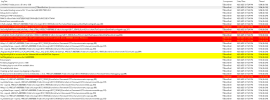
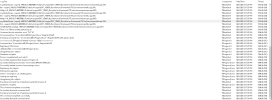
I will put log smsts.log in pictures it will be easier to check it.
I want to create stand alone ISO from my SCCM Task Sequence. For stand alone media I'm task sequence that I use to deploy Windows 11 for PXE boot and for that it is working flawlessly.
But when I create stand alone ISO, burn it to USB and boot in it as soon as it boots I got an error: Unable to read task sequence configuration disk. The computer will automatically restart.
Disk is wiped no data at all. I tired bot GPT and MBR and in BIOS SATA Controller is set as AHCI, Secure boot on (tied with off also). If I open CMD during task sequence I can see that disk.
I will put log smsts.log in pictures it will be easier to check it.

