Forums on Intune, SCCM, and Windows 11

Welcome to the forums. Register a free account today to become a member! Once signed in, you'll be able to participate on this site by adding your topics and posts, as well as connect with other members through your own private inbox!

PENDING "Software Center can not be loaded" after in-place upgrade

on_fifty_six

Member
Messages
10
Reaction score
1
Points
1
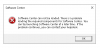
software center.PNG

After doing an in-place upgrade on many of our domain machines it seems like its breaking the client. Has anyone seen this before? What is the most reliable way to repair the client in this case? i have tried using the sccm console option but it never works. i have tried doing the ccmsetup.exe /uninstall and then i was told to use "C:\Windows\CCMSetup\CCMsetup.exe /usePKICert /mp:https://management-point.domain.com SMSSITECODE=XX" but neither are really fixing it.
 
What is your SCCM version?
What is your Windows Client version? (type winver in CMD to get the build version)

Check the ccmsetup.log file to ensure that the client was installed successfully.
  • Log file location: "%WINDIR%\ccmsetup\Logs"
 
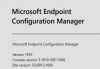
1580499640987.png
If i go to About Configuration Manager I get that.
1580500333829.png
If i go to Administration\ Overview\Site Configuration\Sites\ i get that
Does that help?
Windows version is 1809.
I am upgrading 2 computers right now. I will grab the logs right after they finish. I have a billion computers to pull logs from but none of the remote users seem to be online.
 
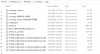
1580504435559.png

My team says they updated the computer on 1/22/2020 but i can find anything in the logs around that time.
 

Attachments

How do you install/upgrade the client? What is the existing and destination client version? Because in the log file, I see the SCCM client version.

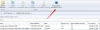
Make sure that you have already promoted the SCCM 1910 client as production-client.
promote client.png
 

Forum statistics

Threads
7,171
Messages
27,990
Members
18,297
Latest member
Kahnrym

Trending content

Back
Top