
Currently on 2103 build. Service connection point was failing to download 2107 patches.
Tried changing service connection point from online to offline to import 2107 build patches .
One thing led to another.
Had to revert back to online mode when imported patches would appear as "available to download" and upon clicking download, remain stuck in downloading state.
Tried clearing updates using CMUpdateReset tool but no luck.
Tried removing/adding service connection point to another server and now it seems multiple issues appearing:
1. Management point appearing in 'critical state'
2. SMS_DMP_Downloader ; SMS_DMP_Uploader; SMS_Outgoing_content_manager; sms_executive ; sms_site_system_status_summarizer - all appearing critical
3. dmpdownloader.log states "SMS_EXECUTIVE signalled SMS_DMP_DOWNLOADER to stop. SMS_DMP_DOWNLOADER is exiting..." and the logfile doesnt seem to change at all after this.
4 hman.log - no errors appearing
5.
Event id 1016 keeps appearing as below for task categories:
SMS_DMP_DOWNLOADER
SMS_CLOUDCONNECTION
SMS_CLOUD_USERSYNC
SMS_DMP_UPLOADER
AS:
"
On "date time", component SMS_SITE_COMPONENT_MANAGER on computer 'xxxxx" reported: Site Component Manager failed to install this component on this site system.
Solution: Review the previous status messages to determine the exact reason for the failure. Site Component Manager will automatically retry the installation in minutes. To force Site Component Manager to immediately retry the installation, stop and restart Site Component Manager using the Configuration Manager Service Manager."
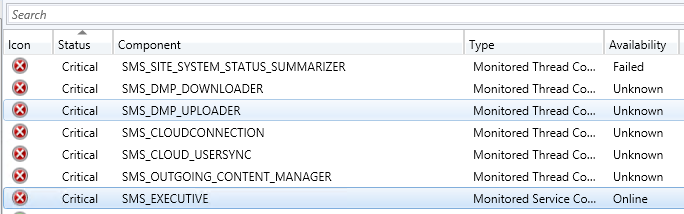
Pretty lost where to start looking at.
Any suggestions pls.
Tried changing service connection point from online to offline to import 2107 build patches .
One thing led to another.
Had to revert back to online mode when imported patches would appear as "available to download" and upon clicking download, remain stuck in downloading state.
Tried clearing updates using CMUpdateReset tool but no luck.
Tried removing/adding service connection point to another server and now it seems multiple issues appearing:
1. Management point appearing in 'critical state'
2. SMS_DMP_Downloader ; SMS_DMP_Uploader; SMS_Outgoing_content_manager; sms_executive ; sms_site_system_status_summarizer - all appearing critical
3. dmpdownloader.log states "SMS_EXECUTIVE signalled SMS_DMP_DOWNLOADER to stop. SMS_DMP_DOWNLOADER is exiting..." and the logfile doesnt seem to change at all after this.
4 hman.log - no errors appearing
5.
Event id 1016 keeps appearing as below for task categories:
SMS_DMP_DOWNLOADER
SMS_CLOUDCONNECTION
SMS_CLOUD_USERSYNC
SMS_DMP_UPLOADER
AS:
"
On "date time", component SMS_SITE_COMPONENT_MANAGER on computer 'xxxxx" reported: Site Component Manager failed to install this component on this site system.
Solution: Review the previous status messages to determine the exact reason for the failure. Site Component Manager will automatically retry the installation in minutes. To force Site Component Manager to immediately retry the installation, stop and restart Site Component Manager using the Configuration Manager Service Manager."
Pretty lost where to start looking at.
Any suggestions pls.

