Forums on Intune, SCCM, and Windows 11

Welcome to the forums. Register a free account today to become a member! Once signed in, you'll be able to participate on this site by adding your topics and posts, as well as connect with other members through your own private inbox!

PENDING SCCM's Updates and Services function has stopped working

  • Thread starter Thread starter bmkiss67
  • Start date Start date
  • Replies Replies 3
  • Views Views 2K

bmkiss67

Member
Messages
6
Reaction score
0
Points
1
Out air-gaped system has an SCCM in it where the Updates and Services function seems stuck/ not working. When you right click on one of the updates the menu comes up with everything greyed out.
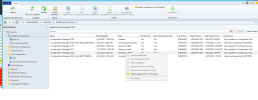
error.png
You'll also note that 2203 failed. I looked in the CMUpdate.log and found that 2203 failed it's hash check:
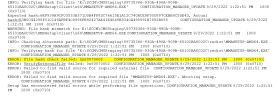
Capture.PNG
First, I'm not sure if the two have anything to do with each other.
Second, I've done some hunting and I can't find a solution to my greyed out menu.
Third, I also can't find a solution for my failed update.

Any help I can get with this would be great!
Thanks a lot!
 
if you are air gapped you will need to use the offline tool to get the updates. a quick google search will point you to the docs on the subject.
 
I see one of the updates has the status of checking prerequisites. This should be completed first before you can select any other options.
 
I see one of the updates has the status of checking prerequisites. This should be completed first before you can select any other options.
Yes, the 2103 Hotfix is the update you are referencing. I may not have made it clear enough, that greyed out menu is what you get when you right click on any of the updates in that list. If I could I would run the 2103 Hotfix but all I get is a greyed out menu. Is there a manual way, outside of SCCM, that I can run that hotfix?
 

Forum statistics

Threads
7,144
Messages
27,894
Members
18,190
Latest member
escdarck

Trending content

Back
Top