

murduk
New Member
- Messages
- 1
- Reaction score
- 0
- Points
- 1
I am updating to version 2403 but it asks me to remove these roles that I don't remember installing. I would really appreciate it if someone could give me some tips.
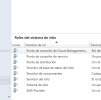
[Bug]: Workload Co-Management slider for resource access policies to Intune. Remove the Certificate Registration Point site system role and all policies for features in Configuration Manager for enterprise resource access. These features are not supported in Configuration Manager as of March 2022. Enterprise resource access includes email, certificate, VPN, Wi-Fi, and Windows Hello for Business profiles. See https://go.microsoft.com/fwlink/?linkid=2186198 for more details.
[Bug]: Workload Co-Management slider for resource access policies to Intune. Remove the Certificate Registration Point site system role and all policies for features in Configuration Manager for enterprise resource access. These features are not supported in Configuration Manager as of March 2022. Enterprise resource access includes email, certificate, VPN, Wi-Fi, and Windows Hello for Business profiles. See https://go.microsoft.com/fwlink/?linkid=2186198 for more details.


