
MatthiasHolzner
New Member
- Messages
- 2
- Reaction score
- 0
- Points
- 1
Hi,
i have an issue with installing SCCM 2503 Update stuck on "[In progress]:Updating CONFIGURATION_MANAGER_UPDATE service. Check hman.log for details."
Is there a way to cancel this update installation? Since it is stuck for ~12h i have also tried to reboot the Server but the Update continues in the exact same status.
Update Status:
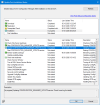
CMUpdate.log:
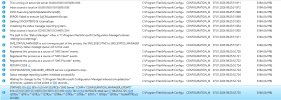
last entry:
STATMSG: ID=502 SEV=I LEV=M SOURCE="SMS Server" COMP="CONFIGURATION_MANAGER_UPDATE" SYS=%SERVER-FQDN% SITE=%SITE% PID=4960 TID=8184 GMTDATE=Wed Jan 07 08:25:52.725 2026 ISTR0="" ISTR1="" ISTR2="" ISTR3="" ISTR4="" ISTR5="" ISTR6="" ISTR7="" ISTR8="" ISTR9="" NUMATTRS=0 LE=0X0
hman.log:
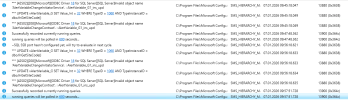
last entries:
running queries will be polled in 600 seconds...
~SQL SSB port hasn't configured yet, will try to evaluate in next cycle.
*** UPDATE vAlertVariable_G SET Value_Int = 32 WHERE TypeID = 1060 AND TypeInstanceID = dbo.fnGetSiteCode()
*** [42S02][208][Microsoft][ODBC Driver 18 for SQL Server][SQL Server]Invalid object name 'AlertVariableChangeInitiatorService'. : AlertVariable_G1_ins_upd
*** UPDATE vAlertVariable_G SET Value_Int = 32 WHERE TypeID = 1060 AND TypeInstanceID = dbo.fnGetSiteCode()
*** [42S02][208][Microsoft][ODBC Driver 18 for SQL Server][SQL Server]Invalid object name 'AlertVariableChangeContract'. : AlertVariable_G1_ins_upd
Successfully recorded currently running queries.
running queries will be polled in 600 seconds...
kind regards
Matthias
i have an issue with installing SCCM 2503 Update stuck on "[In progress]:Updating CONFIGURATION_MANAGER_UPDATE service. Check hman.log for details."
Is there a way to cancel this update installation? Since it is stuck for ~12h i have also tried to reboot the Server but the Update continues in the exact same status.
Update Status:
CMUpdate.log:
last entry:
STATMSG: ID=502 SEV=I LEV=M SOURCE="SMS Server" COMP="CONFIGURATION_MANAGER_UPDATE" SYS=%SERVER-FQDN% SITE=%SITE% PID=4960 TID=8184 GMTDATE=Wed Jan 07 08:25:52.725 2026 ISTR0="" ISTR1="" ISTR2="" ISTR3="" ISTR4="" ISTR5="" ISTR6="" ISTR7="" ISTR8="" ISTR9="" NUMATTRS=0 LE=0X0
hman.log:
last entries:
running queries will be polled in 600 seconds...
~SQL SSB port hasn't configured yet, will try to evaluate in next cycle.
*** UPDATE vAlertVariable_G SET Value_Int = 32 WHERE TypeID = 1060 AND TypeInstanceID = dbo.fnGetSiteCode()
*** [42S02][208][Microsoft][ODBC Driver 18 for SQL Server][SQL Server]Invalid object name 'AlertVariableChangeInitiatorService'. : AlertVariable_G1_ins_upd
*** UPDATE vAlertVariable_G SET Value_Int = 32 WHERE TypeID = 1060 AND TypeInstanceID = dbo.fnGetSiteCode()
*** [42S02][208][Microsoft][ODBC Driver 18 for SQL Server][SQL Server]Invalid object name 'AlertVariableChangeContract'. : AlertVariable_G1_ins_upd
Successfully recorded currently running queries.
running queries will be polled in 600 seconds...
kind regards
Matthias
