Forums on Intune, SCCM, and Windows 11

Welcome to the forums. Register a free account today to become a member! Once signed in, you'll be able to participate on this site by adding your topics and posts, as well as connect with other members through your own private inbox!

SOLVED SCCM Update 1802 prerequisite check failed

  • Thread starter Thread starter Gilbert
  • Start date Start date
  • Replies Replies 9
  • Views Views 12K
Status
Not open for further replies.

Gilbert

Member
Messages
13
Reaction score
2
Points
3
Hello my friends,

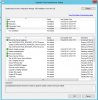
I'm trying to upgrade the SCCM from version 1706 to 1802, but i have a strange problem that i can't figure out what the problem is !
1527067928455.png

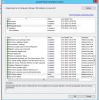
We have SQL Server 2016 SP2, but for no reason it fail to pass it, but when it fail it not stop the setup but it go one step ahead and start installing but even the installing is stuck like in the photo.
1527068106100.png

Can some one please give me a hing what should i do?

Thank you in advance
 
I found some errors in prereq log file. I can see that pre-req check has completed. Can you check each of the below point and confirm if they are fixed ?.

ERROR - Found 'Deployment Tools' component of ADK 8.1. You must install ADK 10

Error - The Windows Deployment Tools component of Windows Assessment and Deployment Kit (ADK) for Windows 10 is required and must be installed before Setup can continue. It is required on primary sites and SMS Provider. It is needed by operating system deployment features of Configuration Manager.

Error - The User State Migration Tool component of Windows Assessment and Deployment Kit (ADK) for Windows 10 is required and must be installed before Setup can continue. It is required on central administration sites and stand-alone primary sites. It is needed by operating system deployment features of Configuration Manager.

Error - Unsupported operating system version for site system role; Warning; Starting with version 1702, Configuration Manager does not support Windows Server 2008 R2 operating system.

Error - Configuration Manager sites require a supported SQL Server version with required hotfixes for site database operations to succeed. Before Setup can continue, you must install a supported version of SQL Server on the specified site database server.
 
Hello,

ERROR - Found 'Deployment Tools' component of ADK 8.1. You must install ADK 10 - Is was ADK 10 (i just reinstalled it just to be sure)

Error - The Windows Deployment Tools component of Windows Assessment and Deployment Kit (ADK) for Windows 10 is required and must be installed before Setup can continue. It is required on primary sites and SMS Provider. It is needed by operating system deployment features of Configuration Manager.

Error - The User State Migration Tool component of Windows Assessment and Deployment Kit (ADK) for Windows 10 is required and must be installed before Setup can continue. It is required on central administration sites and stand-alone primary sites. It is needed by operating system deployment features of Configuration Manager.

Error - Unsupported operating system version for site system role; Warning; Starting with version 1702, Configuration Manager does not support Windows Server 2008 R2 operating system. - The server is Windows Server 2012 R2

Error - Configuration Manager sites require a supported SQL Server version with required hotfixes for site database operations to succeed. Before Setup can continue, you must install a supported version of SQL Server on the specified site database server. - On the site database we have SQL server 2016 SP2
 
My friend,

i have deleted the update from the database and i started again to download and install it.
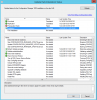
now it pass the prereq but is stuck at this.
1527163165030.png

attach is the CMupdate and it has an error :
Failed to verify redist file for update C:\Program Files\Microsoft Configuration Manager\CMUStaging\EAB25B02-02DD-4A14-B6D0-BA5BDE540D66\redist\ConfigMgr.Manifest.cab
 

Attachments

I think i only reviewed configmgrprereq.log file. From configmgrsetup.log i saw some errors.
INFO: Verifying Configuration Manager Active Directory Schema Extensions.
ERROR: Failed to connect to RootDSE - Cannot verify Active Directory. Error code = 1355.
ERROR: Operation cancelled by user.
SQL Server Native Client 11.0][SQL Server]Login failed. The login is from an untrusted domain and cannot be used with Windows authentication.
 
im so tired on trying to fix it, it has been 3 month that i try.

Is by any chance that you support me by teamviwer because i dont know what to do more
 
Hello,

You can mark as completed as i uninstall and install the new version 1802, but now i have a diferent problem and im going to open another thread.

Thank you for your support
 
Status
Not open for further replies.

Forum statistics

Threads
7,144
Messages
27,894
Members
18,190
Latest member
escdarck

Trending content

Back
Top