Forums on Intune, SCCM, and Windows 11

Welcome to the forums. Register a free account today to become a member! Once signed in, you'll be able to participate on this site by adding your topics and posts, as well as connect with other members through your own private inbox!

PENDING SCCM OSD ending with "Let's connect you to a network"

  • Thread starter Thread starter Stefan A
  • Start date Start date
  • Replies Replies 6
  • Views Views 2K

Stefan A

Member
Messages
6
Reaction score
0
Points
1
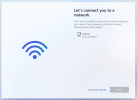
I am facing an issue with the OS task sequence installation on a particular model only of Lenovo. Basically it is stuck on the Lets connect you to a network but without any network devices like the below:

The problem is that on the others models and brands in works perfectly. I also added drivers to the boot image like I usually do.

Any suggestions?
1738323459523.png
 
Does the machine join the domain?. I am asking this because the domain join step is executed before this screen appears. Double-check the network drivers that you've added and make sure Wi-Fi drivers are added (the latest one available for that model).
 
No, no domain join happens. Added all drivers both latest and previous ones for both NIC cards and disabled wifi from bios since the desktop has a wifi card as an option.
 
Hello. We are facing the same issue here.

The OS installation ends without errors. However, in the step between the OS installation and before login to Windows, it appears the screen requesting to connect to a network.

Drivers and driver packages are updated in MECM for the specific model and the computer joins to the domain.

If we omit this screen we can sucessfully login to the computer with our domain credentials and we can see correct network drivers installed.

Any suggestions?

Thanks in advance.
 

Attachments

  • 61o8v0yy1xwd1.jpeg
    61o8v0yy1xwd1.jpeg
    105 KB · Views: 1

Forum statistics

Threads
7,130
Messages
27,846
Members
18,145
Latest member
Rothgar
Back
Top