

TCE
Member
- Messages
- 6
- Reaction score
- 0
- Points
- 1
Hello Everyone
When we checked the MP_Framework.log we found the below errors:
CMpDatabase::GetClientPublicKeyEx(ClientID='GUID:82394135-75B0-4805-BC6B-106A9E130E1A') failed (0x87d00242).
CMPDBConnection::ExecuteSQL(): ICommandText::Execute() failed with 0x80040E14
=======================================
MPDB ERROR - CONNECTION PARAMETERS
SQL Server Name : Secondary Server\CONFIGMGRSEC
SQL Database Name : CM_XXX
Integrated Auth : True
MPDB ERROR - EXTENDED INFORMATION
MPDB Method : ExecuteSP()
MPDB Method HRESULT : 0x80040E14
Error Description : OLE DB provider "SQLNCLI11" for linked server "Primary Server" returned message "Invalid connection string attribute".
OLEDB IID : {0C733A63-2A1C-11CE-ADE5-00AA0044773D}
ProgID : Microsoft SQL Server Native Client 11.0
MPDB ERROR - INFORMATION FROM DRIVER
SQL Server Name : SCCM-XXX\CONFIGMGRSEC
Stored Procedure : MP_GetCacheInvalidationInfo
Native Error no. : 7412
Error State : 2
Line number in SP : 12
=======================================
MPDB ERROR - CONNECTION PARAMETERS
SQL Server Name : Secondary Server\CONFIGMGRSEC
SQL Database Name : CM_XXX
Integrated Auth : True
MPDB ERROR - EXTENDED INFORMATION
MPDB Method : ExecuteSP()
MPDB Method HRESULT : 0x80040E14
Error Description : OLE DB provider "SQLNCLI11" for linked server "Primary Server" returned message "Invalid connection string attribute".
OLEDB IID : {0C733A63-2A1C-11CE-ADE5-00AA0044773D}
ProgID : Microsoft SQL Server Native Client 11.0
MPDB ERROR - INFORMATION FROM DRIVER
SQL Server Name : SCCM-XXX\CONFIGMGRSEC
Stored Procedure : sp_GetPublicKeyForSMSID
Native Error no. : 7412
Error State : 2
Line number in SP : 16
=======================================
CMpDatabase::GetClientPublicKeyEx(ClientID='GUID:82394135-75B0-4805-BC6B-106A9E130E1A') failed (0x87d00242).
And we checked the MP_Policy.log we found the below errors:
MPDB ERROR - CONNECTION PARAMETERS
SQL Server Name : Secondary Server\CONFIGMGRSEC
SQL Database Name : CM_XXX
Integrated Auth : True
MPDB ERROR - EXTENDED INFORMATION
MPDB Method : ExecuteSP()
MPDB Method HRESULT : 0x80040E14
Error Description : OLE DB provider "SQLNCLI11" for linked server " Primary Server" returned message "Invalid connection string attribute".
OLEDB IID : {0C733A63-2A1C-11CE-ADE5-00AA0044773D}
ProgID : Microsoft SQL Server Native Client 11.0
MPDB ERROR - INFORMATION FROM DRIVER
SQL Server Name : SCCM-XXX\CONFIGMGRSEC
Stored Procedure : MP_GetMachinePolicyAssignments
Native Error no. : 7412
Error State : 2
Line number in SP : 16
=======================================
CPolicyManagerHandler::HandleMessage(): SetComplete(DISCARD) called.
CMPDBConnection::ExecuteSQL(): ICommandText::Execute() failed with 0x80040E14
=======================================
Plus, on Primary SQL Server we found
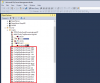
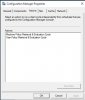
In addition, Configuration manager properties on the client system only show 2 actions
When we checked the MP_Framework.log we found the below errors:
CMpDatabase::GetClientPublicKeyEx(ClientID='GUID:82394135-75B0-4805-BC6B-106A9E130E1A') failed (0x87d00242).
CMPDBConnection::ExecuteSQL(): ICommandText::Execute() failed with 0x80040E14
=======================================
MPDB ERROR - CONNECTION PARAMETERS
SQL Server Name : Secondary Server\CONFIGMGRSEC
SQL Database Name : CM_XXX
Integrated Auth : True
MPDB ERROR - EXTENDED INFORMATION
MPDB Method : ExecuteSP()
MPDB Method HRESULT : 0x80040E14
Error Description : OLE DB provider "SQLNCLI11" for linked server "Primary Server" returned message "Invalid connection string attribute".
OLEDB IID : {0C733A63-2A1C-11CE-ADE5-00AA0044773D}
ProgID : Microsoft SQL Server Native Client 11.0
MPDB ERROR - INFORMATION FROM DRIVER
SQL Server Name : SCCM-XXX\CONFIGMGRSEC
Stored Procedure : MP_GetCacheInvalidationInfo
Native Error no. : 7412
Error State : 2
Line number in SP : 12
=======================================
MPDB ERROR - CONNECTION PARAMETERS
SQL Server Name : Secondary Server\CONFIGMGRSEC
SQL Database Name : CM_XXX
Integrated Auth : True
MPDB ERROR - EXTENDED INFORMATION
MPDB Method : ExecuteSP()
MPDB Method HRESULT : 0x80040E14
Error Description : OLE DB provider "SQLNCLI11" for linked server "Primary Server" returned message "Invalid connection string attribute".
OLEDB IID : {0C733A63-2A1C-11CE-ADE5-00AA0044773D}
ProgID : Microsoft SQL Server Native Client 11.0
MPDB ERROR - INFORMATION FROM DRIVER
SQL Server Name : SCCM-XXX\CONFIGMGRSEC
Stored Procedure : sp_GetPublicKeyForSMSID
Native Error no. : 7412
Error State : 2
Line number in SP : 16
=======================================
CMpDatabase::GetClientPublicKeyEx(ClientID='GUID:82394135-75B0-4805-BC6B-106A9E130E1A') failed (0x87d00242).
And we checked the MP_Policy.log we found the below errors:
MPDB ERROR - CONNECTION PARAMETERS
SQL Server Name : Secondary Server\CONFIGMGRSEC
SQL Database Name : CM_XXX
Integrated Auth : True
MPDB ERROR - EXTENDED INFORMATION
MPDB Method : ExecuteSP()
MPDB Method HRESULT : 0x80040E14
Error Description : OLE DB provider "SQLNCLI11" for linked server " Primary Server" returned message "Invalid connection string attribute".
OLEDB IID : {0C733A63-2A1C-11CE-ADE5-00AA0044773D}
ProgID : Microsoft SQL Server Native Client 11.0
MPDB ERROR - INFORMATION FROM DRIVER
SQL Server Name : SCCM-XXX\CONFIGMGRSEC
Stored Procedure : MP_GetMachinePolicyAssignments
Native Error no. : 7412
Error State : 2
Line number in SP : 16
=======================================
CPolicyManagerHandler::HandleMessage(): SetComplete(DISCARD) called.
CMPDBConnection::ExecuteSQL(): ICommandText::Execute() failed with 0x80040E14
=======================================
Plus, on Primary SQL Server we found
In addition, Configuration manager properties on the client system only show 2 actions


