

awachens
Well-Known Member
- Messages
- 65
- Solutions
- 6
- Reaction score
- 1
- Points
- 8
Morning!
Yesterday reviewing my new client i saw the SMS_MP_CONTROL_MANAGER is getting error.
The error is the following:
MP Control Manager detected User Service is not responding to HTTP requests..
The http error is 500.
Possible cause: IIS service is not responding.
Solution: Manually restart the W3SVC service on the MP
After restart service, the component shows same message.
I check the configure of MP:

I have the certificate in Personal - Local machine:

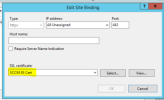
Configured too in bindings:
I add the client certificate in personal store and i can do the request correctly:

In mpcontrol:
Call to HttpSendRequestSync failed for port 443 with status code 500, text: Internal Server Error SMS_MP_CONTROL_MANAGER 18/04/2023 12:09:09 8072 (0x1F88)
Http test request failed, status code is 500, 'Internal Server Error'. SMS_MP_CONTROL_MANAGER 18/04/2023 12:09:09 8072 (0x1F88)
UPDATE:
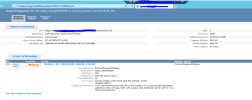
Using FRT we can see this error more clarify:
UPDATE 2:
I deleted the header in applicationhost.config
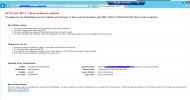
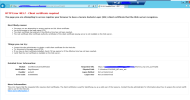
Now I'm still getting the error in mpcontrol.log and FRT say this:

First of all make you sure have a backup of applicationhost.config
TIA!
Yesterday reviewing my new client i saw the SMS_MP_CONTROL_MANAGER is getting error.
The error is the following:
MP Control Manager detected User Service is not responding to HTTP requests..
The http error is 500.
Possible cause: IIS service is not responding.
Solution: Manually restart the W3SVC service on the MP
After restart service, the component shows same message.
I check the configure of MP:
I have the certificate in Personal - Local machine:
Configured too in bindings:
I add the client certificate in personal store and i can do the request correctly:
In mpcontrol:
Call to HttpSendRequestSync failed for port 443 with status code 500, text: Internal Server Error SMS_MP_CONTROL_MANAGER 18/04/2023 12:09:09 8072 (0x1F88)
Http test request failed, status code is 500, 'Internal Server Error'. SMS_MP_CONTROL_MANAGER 18/04/2023 12:09:09 8072 (0x1F88)
UPDATE:
Using FRT we can see this error more clarify:
UPDATE 2:
I deleted the header in applicationhost.config
Now I'm still getting the error in mpcontrol.log and FRT say this:
First of all make you sure have a backup of applicationhost.config
TIA!
Attachments

Last edited:


