Forums on Intune, SCCM, and Windows 11

Welcome to the forums. Register a free account today to become a member! Once signed in, you'll be able to participate on this site by adding your topics and posts, as well as connect with other members through your own private inbox!

PENDING SCCM: Locking the BIOS during OSD

  • Thread starter Thread starter TOTO JDD
  • Start date Start date
  • Replies Replies 3
  • Views Views 3K

TOTO JDD

Well-Known Member
Messages
46
Reaction score
5
Points
8
Hello,

Does anyone have any idea how to lock the BIOS with SCCM via the task sequence?

I do not want users to have access to the BIOS.

Computer Manufacturer: Fujitsu

Cordially.
 
Honestly talking to the support team at Fujitsu is the best place to start. They can give you the tools you need for this.
 
Hello,

Does anyone have any idea how to lock the BIOS with SCCM via the task sequence?

I do not want users to have access to the BIOS.

Computer Manufacturer: Fujitsu

Cordially.
I have done similar thing with Dell laptops by using CCTK. I think there should be a similar tool provided by Fujitsu and only Fujitsu support can confirm on this.
 
Hello everyone,

I found on Google the documentation of DeskView instant - Bios Management (https://www.yumpu.com/en/document/view/19365215/deskview-instant-bios-management-fujitsu-uk) I downloaded and used it to create a package in SCCM with as command line BiosSet.exe / NEWPWD = YourPassword and it works fine to lock the BIOS.

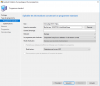
When creating a package: Create a package of standard program type with as command line BiosSet.exe / NEWPWD = YourPassword

image 1.png

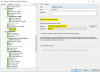
Add the package in the task sequence: Add a step after Windows Setup and ConfigMgr, type Install Package. Just select your package.

image 2.png
 

Forum statistics

Threads
7,157
Messages
27,936
Members
18,239
Latest member
rajg

Latest posts

Back
Top