Forums on Intune, SCCM, and Windows 11

Welcome to the forums. Register a free account today to become a member! Once signed in, you'll be able to participate on this site by adding your topics and posts, as well as connect with other members through your own private inbox!

PENDING SCCM client push install Error 0x80041002

  • Thread starter Thread starter sparana
  • Start date Start date
  • Replies Replies 11
  • Views Views 28K

sparana

Member
Messages
7
Reaction score
0
Points
1
Hi i am having some issues on my sccm environment. When i image a new computer the client does not install correctly. I have checked the ccmsetup.log and found the following on the client side.
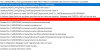
1587998905472.png


I have checked the WMI status on the client pc.
Clients only show the following actions
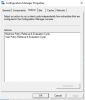
1587999162738.png
I also noticed CCM notification agent is disabled.
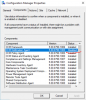
1587999119931.png

I was wondering if you could help me figure out what is wrong here.
 
The setup ran correct, there is nothing wrong with the log snip-it. However, your boundaries are likely wrong, and that is why you have only two actions in the control applet.
 
The setup ran correct, there is nothing wrong with the log snip-it. However, your boundaries are likely wrong, and that is why you have only two actions in the control applet.

I double checked the boundaries and boundary groups. Non of those have changed. The DP has the correct boundary group.
 
I did some checks.
boundary groups, boundaries are all good.
Management point health is ok mpcontrol.log -- no issues.
i have checked connections to the MP with no errors using
http://servername.domain.com/SMS_MP/.sms_aut?mpcert and http://servername.domain.com/SMS_MP/.sms_aut?mplist
ccmmessaging.log locationservices.log clientlocation.log - shows the correct mp, shows correct site code, shows the certificate has been pulled.
Client is assigned to the site but it seems it doesn't download policies.
checked if the new clients are stuck in provisioning mode and they are not
REG ADD HKEY_LOCAL_MACHINE\SOFTWARE\Microsoft\CCM\CcmExec /v ProvisioningMode /t REG_SZ /d false /f​
REG ADD HKEY_LOCAL_MACHINE\SOFTWARE\Microsoft\CCM\CcmExec /v SystemTaskExcludes /t REG_SZ /d "" /f​

As a final resort i did remove the MP role-> rebooted and re-add role-> reboot. still doesn't download the policies.

I came across this article from your forums : https://forums.prajwaldesai.com/threads/configuration-manager-client-missing-actions.311/
 
So you are running DP and MP on HTTP which is fine.

As per policyagent.log I see Signature verification failed for PolicyAssignmentID.
This behavior happens when the SCCM client installs but cannot retrieve it's policy. This could happen due to two reasons.

1. Client cannot find it's Management Point in AD - I believe you have already gone through the LocationServices.log and ClientLocation.log file on the client. Ensure that the site and MP info have been published to AD.

2. Firewall/WMI issues - Try manual sccm client install and check if that works.

Can you also examine ClientIDManagerStartup.log and see if there are any errors in it ?.
 

Forum statistics

Threads
7,182
Messages
28,011
Members
18,317
Latest member
rbushart

Trending content

Back
Top